Introduction
Software development has become a great deal easier over the past few years. Describing a feature in plain language and getting a working version back is now an ordinary way to begin, and simple things – an internal tool, a landing page, and a small booking app – are built by people who have never written a line of code.
A demo is as far as that goes. Load, security, data, integrations, uptime, and the rules of the market you sell in are all still ahead, and a prototype shows you none of them. Projects go wrong in the distance between something that runs and something you can hand to paying customers, and it is longer than it looks.
The familiar conversations start there too. When you are not a technical specialist yourself, it can be hard to follow why things are not going as expected, or what the team needs more time and people for. And it is fair to wonder why the project cannot be finished on schedule and on budget, despite everything the developers are putting into it.
And when the product is your own, you may need to reduce cycle time, improve predictability and your developers’ satisfaction level to speed up project development. That’s why planning is so important.
Regardless of the project complexity, you need a working and effective project plan.
What software development planning is
Software development planning is a process aimed at enhancing the predictability of delivery, which includes the collection of requirements, the design and build of the product, and discovery work to identify the unknown or risky aspects of the project.
The sections below walk through it stage by stage, from the first conversation with a development partner to the rules that apply once the product is live.
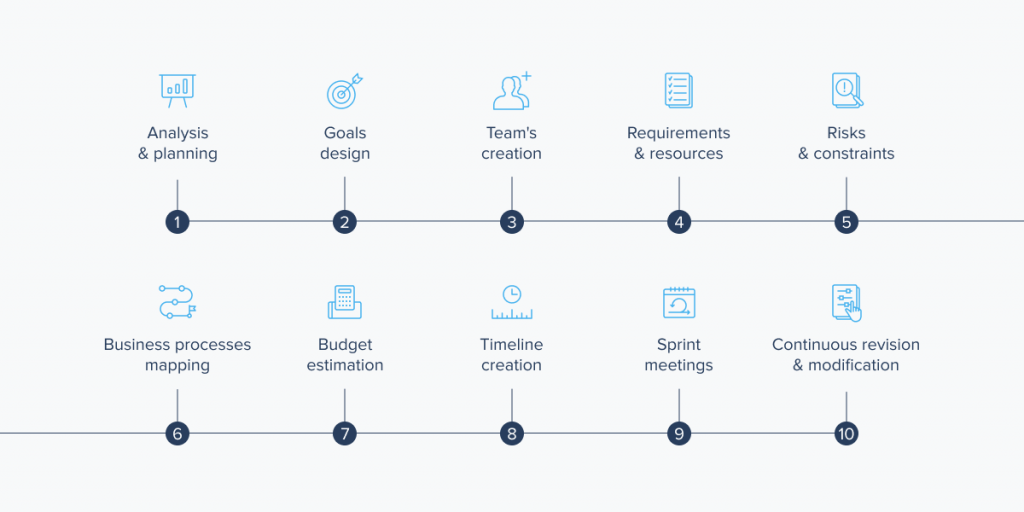
Guide to software development planning
Below are the most common stages of a software development project. Use them as a guide when working out the details of your own.
Analysis and planning
Planning begins with a handful of questions. Some you answer yourself, and a development partner will ask the rest at the first meeting:
- How does this project fit into the mission and goals of your company?
- Does your company have enough resources to make the project a success?
- How does this project fit in with the schedule of other projects and goals?
- How much will it cost?
- Does the product handle personal data, work in a regulated sector, or include an AI component?
Ask the last one at the start, because the answer shapes the architecture, and that is the expensive thing to change later.
Project goals
When defining project goals, specify intentions, vision, and a preferred endpoint. This clarity makes it easier to predict the outcome, for you and for the team building it.
Defining goals is also important for writing a realistic and concise project plan. The software should automate certain tasks, increase productivity, or optimize processes. With this in mind, determine how to quantify success.
Agree on those measures before development starts. Product goals are usually written as OKRs, while the health of delivery itself is tracked with four figures: how often you deploy, how long a change takes to reach users, how often a change breaks something, and how quickly service is restored. Both sides then have the same answer to whether the project is going well.
Requirements
Requirements say what the product has to do, in enough detail that someone can put a number on it. They come from everyone who will live with the result: the client, the staff who use the product day to day, and whoever has to support it afterwards.
That list has to be put in order, because a set of requirements where everything is essential cannot be scheduled. Once the priorities are agreed, features are broken into smaller tasks, and only then can anyone estimate them with confidence.
Writing all of that down has its own tooling: Amazon’s Kiro and GitHub’s Spec Kit take a description of what you want and produce requirements, a design, and a task breakdown. However, they come with limits. The generated documents are verbose enough that reviewing them is tedious, and the agents meant to follow the spec regularly ignore it. Someone on the team has to read that draft line by line, because it sounds equally confident about the parts it invented.
Requirements do not stay settled. Large projects often involve multiple stakeholders or broad goals. In these cases, the specific goals may shift at any time. Therefore, your plans must have a certain level of flexibility, which helps you work around sudden changes and still hit the target.
Discovery and prototypes
When some major features are new, critical, and risky, you have to conduct research about their implementation to reduce these risks before they reach production. It’s good practice to consider several different approaches and find the one that is perfect for your product architecture and goals.
A rough build is the quickest way to do that research. Lovable, v0, and Bolt turn a written description into a clickable app, and Cursor, GitHub Copilot, and Claude Code do the same inside an existing codebase, so putting up three versions of a feature and seeing which one lands takes an afternoon. The prototype settles whether the idea works, but it leaves open how the thing behaves under load and who is liable when the data leaks, which is why the rest of the discovery phase still matters: a solution vision, a requirements specification, a risk assessment, and a real estimate.
Team composition
Choosing the right people for your development team contributes to the success of the project.
Some software development project teams are divided into several smaller groups, each focused on its own task. Any of those groups can sit inside your company or with an outside partner. Work goes to a partner when nobody on staff has the skill, and also when it is needed for this project only.
With so many people and departments involved, it is necessary to have one person setting the direction. That should be a senior project manager or product owner who makes the final decision on all major questions regarding the workflow.
The size of that team is a separate question. Assistants and coding agents change how much ground a given headcount can cover: routine implementation, scaffolding, and test fixtures need fewer hands, so a smaller group carries more scope. The constraint moves to review instead, and DORA’s 2025 research describes reviewers carrying a much heavier load where adoption is high, since reading code you did not write is slower than writing it. It is one of the clearer places where AI tools fall short. In practice that means fewer juniors and more senior time spent reading, so ask who does that reading and how much of their week goes to it.
Resources
With the requirements in hand, teams can see what resources they need to achieve the desired result. When writing down the necessary resources, think about the following elements:
- Budget;
- Time;
- Tools and licenses.
Tools and licenses are the least obvious of these. Subscriptions to coding assistants, CI minutes, model API calls, and third-party services make up a standing monthly cost on most projects. On a product with an AI feature inside it, the inference bill grows with every user.
The mix will be different for each software development project plan. It depends on the idea and the size of the work. The availability of resources determines the timing of tasks and results of their completion.
Risks and constraints
At this point clients, developers, and anyone else involved can identify potential problems, especially the ones that can slow down or stop the process. They can be classified by production stages, such as product development or launch. It is also good to take unforeseen circumstances into account.
Many software development teams use a risk matrix to prioritize potential problems. It shows the probability of each and predicts the consequences.
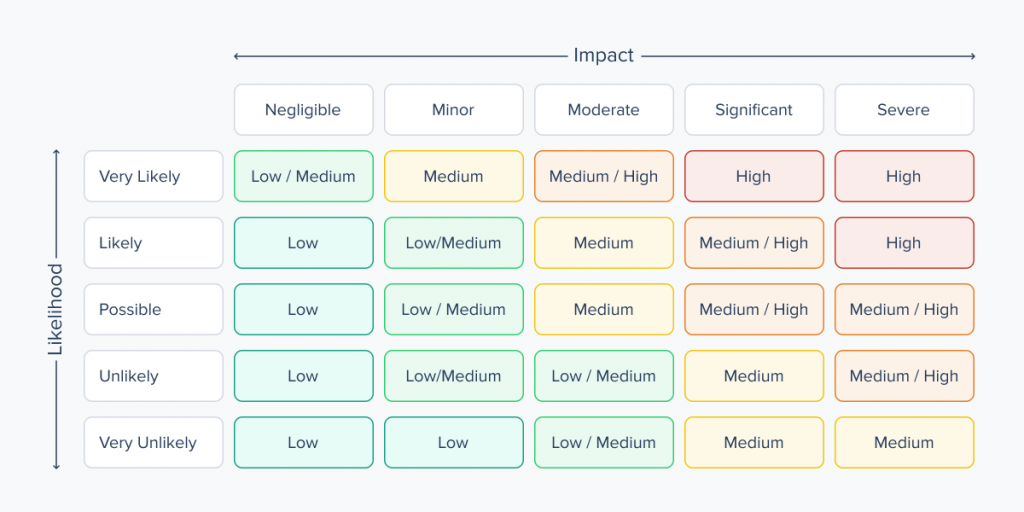
The list should cover both sides: technical risks and business risks. The four at the bottom are the ones most often missing:
- Management support;
- Suitable schedule;
- Appropriate budget;
- Availability of qualified software developers;
- Third-party dependencies;
- Vendor lock-in;
- Data residency;
- Security defects in generated code.
Security defects in generated code are the hardest of these to see coming, because what comes out looks right: it compiles, it reads cleanly, and it survives a quick review. How often it is unsafe anyway has been measured: Veracode asked a range of models to write code for everyday tasks, tested what came back, and found one of the ten most common classes of vulnerability in 45% of it. That is frequent enough that scanning needs a line in the plan and in the budget.
Budget estimation
Every action in a software development project carries a cost. That’s why it’s so crucial to define plans, requirements, and goals first. This will help to make an estimate of the total cost of the project.
That total is the part most estimates get wrong. Building is the visible cost, but review, testing, security work, and keeping the result maintainable make up the larger half of the bill on any product that has to run in production, and an estimate that counts only the build will come up short.
There must be a balance between budget and quality. Outsourcing is one way to strike it, though it helps to be precise about where the saving comes from, since the hourly rate is seldom the answer. Instead, a fixed cost becomes a variable one, and the people who do security reviews and architecture work arrive when the project needs them, with no six-month hire attached.
Timeline creation
The software development plan must contain an approximate definition of all the project stages, a timeline of the necessary steps and their deadlines. To have a clear idea of how the development should progress, divide the project goals into achievable tasks.
Before starting a task, it is not always 100% clear how to finish it completely. So take the time to make a list of what needs to be done and use as much detail as possible to make the big picture clearer. Having a list of tasks and an overview of the budget and human resources, you can estimate the time needed. Milestones are an important part of the timeline.
The trap in all of this is how fast the work feels. A team’s sense of its own pace is a poor input to a forecast, and the gap between the feeling and the record tends to surface at the deadline. Forecast from how long comparable tasks have actually taken on your own projects, and quote a range with a confidence level attached. In addition, the project manager must ensure that the project follows the created plan and updates the forecast as real numbers arrive.
Sprints and planning cadence
Sprints are fixed-length iterations, usually one or two weeks, each ending with something the team can show. Their value lies in the checkpoint: at the end of every one, scope gets compared against reality, and that comparison keeps a plan honest.
Each sprint opens with a planning session where the team agrees what it will take on, and closes with a review and a retrospective. The daily standup is a separate and much shorter check-in. Where the two are run as one meeting, you get a long session that decides little.
Sprints also suit some work better than others. Teams doing continuous delivery or support-heavy work often drop fixed iterations, pull work from a prioritized queue, and measure progress by cycle time. On maintenance and integration projects that usually fits better. Decide which model you are running before you plan, because they produce different estimates.
Who takes which task is normally settled by the team itself at sprint planning.
Production readiness
Testing, tracking, and bug fixing are performed in parallel with the software development process. This is a continuous task aimed at eliminating as many problems as possible and moving the project forward.
A prototype and a product separate at this stage, and the difference does not show in a demo. The work here is to make failures show up before your users find them: tests that run automatically on every change, so something broken surfaces in minutes while it is still cheap to fix; scanners that read the code for security holes nobody would catch by eye; a release that goes to a small share of users first, with monitoring that reports what went wrong and a switch that turns the feature off without shipping anything new. The tools are standard – GitHub Actions or GitLab CI for the test runs, Snyk or Dependabot for the scanning, Sentry for the monitoring – and a partner should be able to tell you which ones they use.
Even after launch, it is useful for developers to look back at their work from time to time. Keeping the old versions of a shipped solution matters: if disputes arise during development, returning to one of them settles the question. Version control handles this: every change is recorded in Git with a note on what it was for, each release is labeled, and any earlier state of the product can be restored exactly as it was. When a release breaks something on a Friday evening, the team can put the previous one back in minutes.
Rules that apply to your market
Compliance belongs in planning because it changes architecture, documentation, and testing, and retrofitting it is expensive. Which rules apply depends on what the product does and who uses it, so work that out before the design is fixed.
Healthcare products fall under HIPAA, which decides how patient data is stored, who can see it, and what the business associate agreement with your vendor has to cover. Anything that touches card payments falls under PCI DSS. Selling to enterprise customers usually means a SOC 2 report, and because the audit looks back over a period of months, the controls have to exist in the system before the clock starts.
Consumer products run into state privacy law, which is the harder part to track. Twenty states now have comprehensive rules on the books, and they differ on consent, on what counts as sensitive data, and on deletion rights. Designing for the strictest one you serve is usually cheaper than branching the logic.
If any of your users are in Europe, GDPR applies to you regardless of where the company sits, and it decides lawful basis, retention, deletion, and the location of the data. A product with an AI component sold into the EU also falls under the EU AI Act, whose transparency obligations took effect in August 2026 and whose high-risk category follows in December 2027.
State-level AI rules are moving quickly enough that naming dates is unwise. Texas has a governance act in force, Colorado’s is being rewritten as its effective date approaches, and more are in progress.
Planning principles that make life easier
These are the principles a development team should be working by. If you are the one commissioning the work, they double as a checklist of what to ask about before you sign.
Let the team scope the work to the date
The date itself usually comes from the business, and that is legitimate: a launch window, a contract, or an event fixes it. The team’s part is to say how much work fits inside that date. When a project manager who does not understand the scope and specifics of the tasks commits to more than that, the plan was never achievable to begin with. The atmosphere in the team becomes oppressive and demotivating, problems follow one after another, and developers are the ones who get all the blame.
Break the project into smaller stages
Breaking the work into stages counteracts Parkinson’s law, which states that the total amount of work will always increase in order to fill all the time allocated for work. Breaking down the process of achieving the global goal into control periods with specific tasks that must be completed within a week or two will allow you to use the working potential of the team to the maximum.
Keep the team in close contact
Close contact increases the cohesion of the team and encourages mutual assistance. When the communication between members of the team is insufficient, there is no “team spirit” that ensures coordinated work. Following this principle also allows you to painlessly replace any member of the team because the participants are all aware of who is doing what and how they’re doing it.
Most teams are spread across offices and time zones, so closeness has to be arranged: decisions written down where everyone can find them, agreed response times, and a few hours of overlap in the working day.
Reserve time for the unexpected
It is impossible to foresee all situations that might arise over the course of the development process during the initial stage of planning. Therefore, you need to reserve some time so that the team does not have to rush its work and make mistakes as a result. Do not ignore the time needed to debug the software in order to bring it to the necessary level of stable operation with an acceptable number of bugs.
Don’t compress the schedule by breaking the plan
A common mistake of managers is thinking that programmers will be able to pull any deadlines. First, this approach makes the team demotivated, sabotages the work process, and can push good developers to quit. Secondly, a sharp acceleration of work operations depletes the resources of the human body and psyche, leading to professional burnout. Thirdly, rushed work leads to an increase in the number of errors in the code. It will take significantly more time to debug and fix them in the future, so it’s better to plan carefully and save the time needed for that right away.
Document the plan in a task manager
Plans should be written down. Visibility is required for both developers and customers, while maintaining the ability to make changes. This makes the development process easier to understand for the development team, management, and the client. Furthermore, the number of disputes regarding the interpretation of work actions can be reduced if you put emphasis on making the wording of the plan as clear as possible, avoiding possible double meanings.
Jira is still the usual choice on larger projects and for client reporting, Linear is common with product teams, and Asana or Notion turn up where non-technical stakeholders need to follow along. Which one matters less than keeping the plan current in one place everyone can open.
Prioritize tasks and focus on what matters most
Try to implement the most important functionality first. Keep in mind that some features and the implementation of some ideas will have to be sacrificed in the development process. And prioritization is possible only through communication and an exchange of views.
Conclusion
Building a first version is quick now, so the difficulty sits elsewhere: in deciding what the thing should do, what it costs to run, and what happens when it breaks. A plan is how those decisions get made and written down. It serves as a guide to keeping the project in line with the budget, resources, and deadlines. This, in turn, helps to achieve the set goals and maintain clear and effective communication.
Yes, writing a software development project plan takes time, but the investment is worth it. If you already have a prototype and need it turned into something you can put in front of real users, that is the work we do: architecture, security, testing, deployment, and the compliance obligations that come with your market. Bamboo Agile has been building custom software for clients in regulated industries for years, and we are happy to look at what you have built so far. Contact us to get a free consultation and ensure that your project will be in the right hands.