Bamboo Agile | Bespoke software development company
Bamboo Agile is an Estonia-based custom software development company that crafts bespoke solutions for telecom, education, healthcare, finances, other sectors.
Enterprise resource planning (ERP) should act as the central nervous system of your operations, a conductor that synchronizes every moving part. Yet too often, what promises cohesion creates conflict. The reasons behind this vary. It can be poor data quality or wrong software fit, or maybe resistance to change. But the results are always the same, namely, millions in expenses and loss in productivity.
Thus, what is the best way to incorporate ERP into your business and make it a success? In this article, we explore the question above. Our team explains what modern ERP truly incorporates today, from architectural choices to the realistic role of AI in daily operations. Our aim at Bamboo Agile is to share our insights on how to make ERP software that will last you years and be flexible and intuitive to use – as well as make your team forget about considering Excel as an ERP tool.
Do not let ERP adoption fail silently
Recent industry insight shows quite depressing data. According to the latest analysis from Gartner, more than 70 percent of recently implemented ERP initiatives do not fully meet their original business case goals – and up to 25 percent perform so poorly that they are deemed catastrophic by stakeholders.
Another survey by Rimini Street and Censuswide Research notes that 97 percent of C-level executives state current ERP systems do meet their business goals, but 23 percent of workforce time is spent on maintenance of those existing systems. This also drains a big chunk of the budget – survey participants claimed 39 percent of their IT budget goes to ERP.
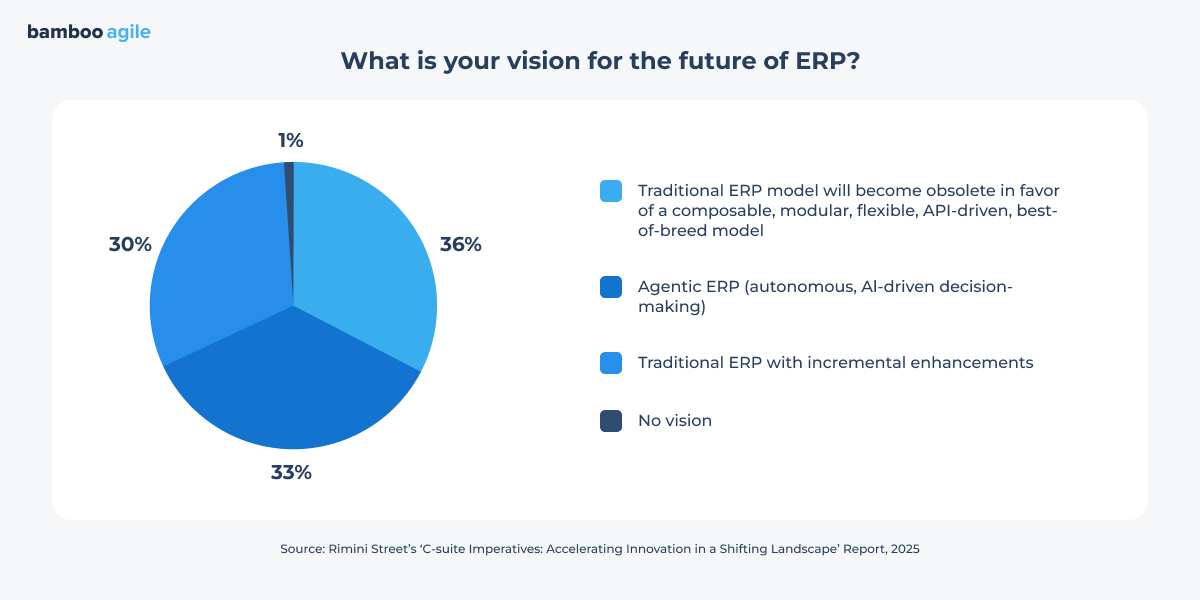
In this case, it is no wonder that more than a third of respondents believe the traditional ERP model is on its way to becoming obsolete, and the only way for it to survive is to adapt and become modular and AI-driven.
This is why, below, we share a step-by-step approach on how to develop your ERP system so its adoption does not fail.
Start with strategy, not features
We can get straight to the point – ERP projects often fall through because people reject them. During planning, executive teams focus on modules and integrations, yet ignore the way employees actually work. Six months later, planners return to spreadsheets, warehouse staff bypasses the system, and managers question the investment.
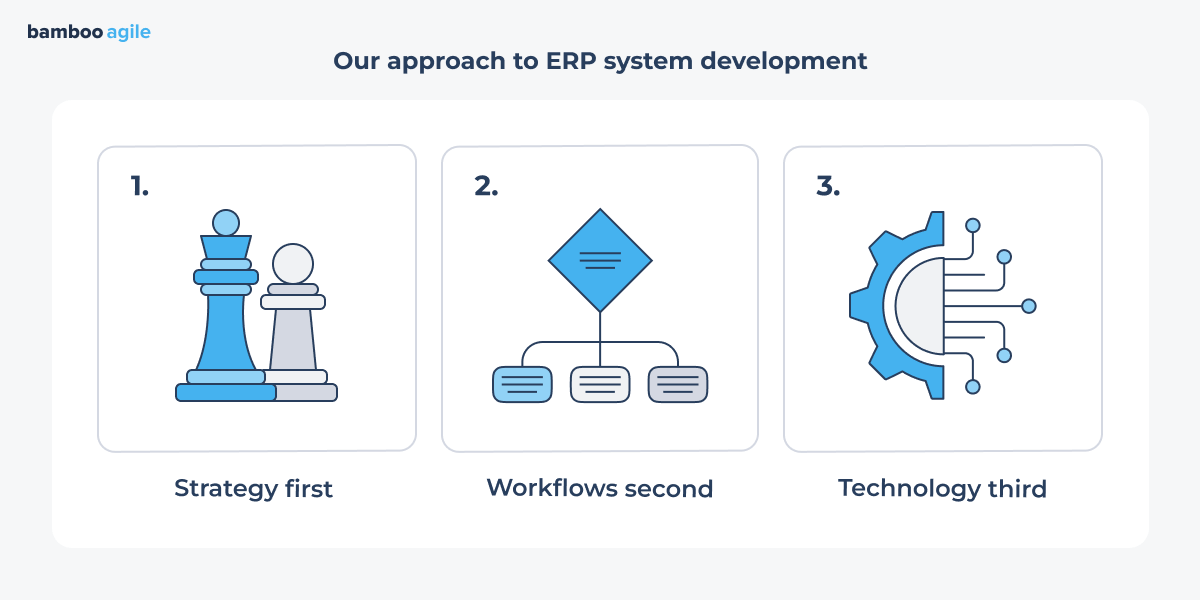
At Bamboo Agile, we consider a different angle to ERP system development: strategy first, workflows second, technology third.
Identify the processes and KPIs that actually matter
ERP discussions often start in meeting rooms, far from where the real adoption takes place. Yet, success depends on what happens in daily operations.
The best advice here would be, first of all, to examine the processes that directly affect revenue and costs – as well as customer satisfaction. For example, if your industry is manufacturing, this can involve tracing the path from sales order all the way to shipment. Where does downtime occur? Which approvals delay material release? At what point do planners leave the system and revert to spreadsheets? These moments reveal structural gaps that no feature list can fix.
In logistics, the same principle applies. Follow the lifecycle of an order from intake to final delivery. If dispatchers constantly override automated plans or warehouse supervisors maintain parallel tracking files, your future ERP must address those exact pressure points.
Once you map these processes, connect them to concrete KPIs. A system built to ‘improve efficiency’ lacks any direction. Meanwhile, if your ERP system is designed to reduce order-to-ship time from five days to three, or to cut manual inventory corrections by 40 percent, it has a measurable goal.
Decide where automation and AI can remove bottlenecks or repetitive work
Once you define the processes and KPIs that matter, examine where teams spend time on repetitive tasks or those that are most likely to end in an error. Where does manual effort take hours and add the least value?
Inside industries, predictive models can analyze equipment data and forecast shop floor failures in manufacturing. When the system detects abnormal patterns, it automatically creates a repair work order and generates troubleshooting instructions for technicians.
In supply chain and order management, analytics can flag disruptions that may affect open orders. Generative AI can then draft customer notifications based on those insights. The value does not come from the generated message itself, but from the speed and consistency of communication during disruptions.
Human capital management offers another practical case. When opening a new position, GenAI can draft job descriptions based on required skills and past role profiles. For those in finance, the same technology can produce narrative explanations for monthly variance reports. This frees analysts from repetitive commentary and allows them to focus on interpretation.
Our team at Bamboo Agile takes a pragmatic approach to artificial intelligence in ERP software design. We guide clients through focused AI use-case validation before rollout. Our main aim is to ground AI in business values rather than experimentation for its own sake.
Develop ERP system workflows that can change
If you create an ERP system that can change, you give teams tools to adjust processes and support them with guidance.
What are the best tactics to follow at this stage, then, when developing an ERP system?
Build in ways to adjust workflows without rewriting code
One of the biggest ERP frustrations is rigid workflows – and in complex systems, it is next to impossible to make any change to them without a code rewrite. The solution to this can be modules with drag-and-drop builders, as they let teams configure steps or add fields without calling a developer. For instance, a warehouse team might need to insert an extra quality check during peak season. Instead of waiting for a software update, they can adjust the workflow themselves.
Your warehouse manager should not need Python knowledge to tell the system when to suggest a bin reorganization. Build a rule engine with if/then logic presented in dropdowns and simple text fields. It can look like this:
If [item turnover rate] is [less than] [2 per month], then [suggest move to remote storage].
If [carrier] is [FedEx] and [package weight] is [over 50 lbs], then [require lift gate notation].
Support users with intelligent suggestions
An ERP system should act like a helpful colleague rather than a source of irritation, because humans are busy. They tab through forms and sometimes miss critical information – and this is where ERP should help. Here are some ideas on how this might work.
Build in hints that appear when a user hesitates on a field
Show a small note that says ‘Most orders from this client require a freight code’
Highlight incomplete sections in the interface before the user tries to submit
If someone enters a quantity that exceeds standard packaging, flag it immediately and suggest the correct unit of measure.
Machine learning modules can go even further and detect patterns where employees repeatedly make corrections, thus prompting smarter recommendations.
Learn from shadow workflows to improve design
As we mentioned above, a clever ERP system development processshould take into account the needs of its user first. Many companies continue to rely on Excel or niche tools for certain processes even after ERP deployment.
Pay attention to these shadow workflows. If you see that one of your teams is using spreadsheets to calculate load weights because the ERP module does not support it, that is product feedback. Or, in your case, that spreadsheet is a feature request. The goal is to pull those shadow functions back into the system, where they belong, so your people can stop fighting the tool and get back to work.
Build dashboards employees would actually want to use
It often happens that ERP dashboards are designed for executives. They show high-level KPIs and rolling revenue charts, but that information means little to a shift supervisor or a procurement specialist.
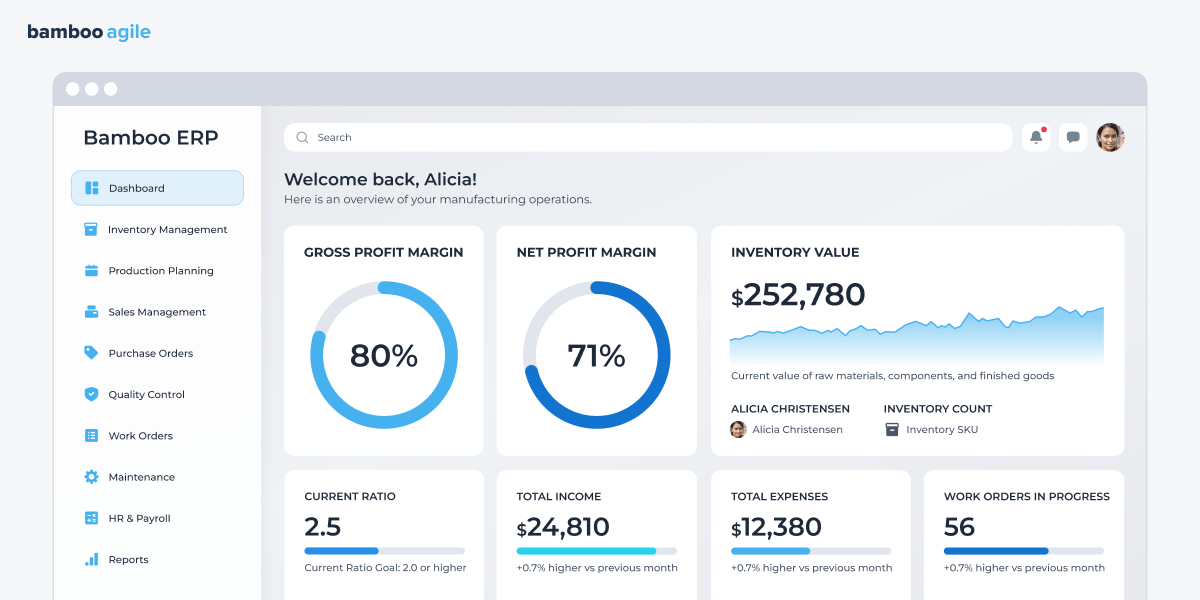
A useful dashboard answers the question ‘What needs attention right now?’. For a production manager, it can show the three jobs that are behind schedule and explain why. For a buyer, it can highlight the parts that are approaching the reorder point and the current lead times from suppliers.
What we might recommend is to use color and layout in your ERP software design to direct the eye. Do not clutter the screen with data users cannot act on. When the dashboard helps them make faster decisions, they will open it by choice, not because the management told them to.
Introduce step-by-step user onboarding
If you drop a new module on someone with a quick training session and a user manual, it is a recipe for low adoption. People learn by doing – and they need guidance the first few times they perform a task.
A step-by-step onboarding flow that is embedded in the system can replace dense manuals. Instead of a separate PDF or training session, the ERP itself can walk employees through tasks. A well-designed system can highlight fields or calculations in context. For instance, when a new user logs in for the first time, the system can accentuate the ‘Create Purchase Order’ button and explain the two fields that actually matter for their role.
Track friction points and fix them fast
Even the most well-planned ERP needs adjustments after launch. For this very reason, your ERP should include instrumentation that shows you where users struggle. Which screens have the highest error rates? Where do people spend the most time before moving to the next step?
Set up alerts for these areas of friction. If you see that ten people abandoned a sales order form at the same field this week, investigate that field. Maybe the validation rule is too strict, or the instruction is unclear. Then, fix them as soon as possible. A culture of continuous, small improvements keeps the system feeling fresh and responsive.
Integrate AI, but do it strategically
AI has matured enough to be a practical tool for your ERP system. To successfully integrate it, however, one requires specific knowledge. We offer insights on how to make erp software with AI based on the best practices.
Use AI to predict, suggest, and automate wisely
Everything starts with prediction. To see how AI helps here, we may take a look at manufacturing. AI models trained on such data as historical orders and supplier lead times can forecast demand more accurately than rule-based systems.
For example:
Predict stockouts before they occur
Recommend production batch sizes based on real order pipelines
Detect anomalies in procurement pricing
Forecast maintenance needs based on machine sensor data.
Many established ERP vendors have already moved in this direction. SAP introduced Joule, an AI copilot embedded across its business applications, which can surface insights from operational data and suggest next steps. Microsoft integrates Copilot into Dynamics 365 to generate demand forecasts and summarize supply chain risks. Oracle embeds predictive planning features into Oracle Fusion Cloud ERP to flag unusual transactions and financial deviations.
Bamboo Agile knows how to build an ERP system to fit your processes
AI recommendations mean nothing if your plant manager or CFO cannot trace the logic. Transparency is a design requirement. If your AI suggests a stock replenishment order, the interface should show the contributing factors, like current lead times from a specific supplier or a recent spike in returns.
There is a particular example of Tennessee’s recent RFI for a new state ERP system. It explicitly demanded ‘auditable chain-of-thought tracking’, as the users need to know why the system flagged a certain procurement as a risk or predicted a budget shortfall.
Avoid unnecessary automation
As AI is the industry that attracts hefty investments, it might feel almost natural to ask for ‘AI in my ERP system’. But before implementing AI, you need to understand why and where you should do this. As McKinsey reports, AI for the sake of AI ‘has led to a proliferation of use cases and experiments that are unsupported by the underlying end-to-end processes’.
Before building AI-driven automation, ask three questions:
Does this task follow stable patterns?
Can we measure model accuracy clearly?
What is the business cost of a wrong decision?
If the cost of error exceeds the efficiency gain, keep a human in the loop.
Build for flexibility, not rigidity
In industries where ERP adds the most value, like manufacturing or logistics, operations rarely stay still. A new warehouse opens, a plant adopts IoT sensors – you name it. What matters is that your ERP system should adjust to these changes without major rework.
There are several ways to achieve this.
Use a modular ERP design so you can update the system without disruption
A modular architecture draws well-defined lines between business functions. You build each domain as its own service or module. Need to change one part? Go ahead – the rest keep running.
For example, when a logistics company expands into cross-border shipping, you may need new customs handling logic. In a monolithic system, this change touches multiple tightly coupled components. But if you choose microservices or well-defined service boundaries for the development of an ERP system, you can later extend or replace the customs module without rewriting procurement or billing.
Integrate systems via APIs to reduce manual handoffs
But even the best ERP does not operate alone. Companies connect various systems like MES, IoT platforms, supplier portals, freight forwarders, EDI gateways, CRM tools, and BI platforms. On paper, each tool supports a specific function. But in reality, gaps between them often create chaos.
An API provides a well-defined way for systems to exchange data automatically. Systems send and receive information in real time and no longer rely on manual transfers. Consequently, data flows freely across departments without human intervention.
Choose cloud deployment for scale and easy management
Running servers in your own office builds invisible walls around your business. You have to predict what you will need two years from now and buy the machines today. If you guess too low, everything runs slowly. If you guess too high, you waste money on equipment that just sits there.
Then, a busy season hits. You need more power right away, but you wait for someone to approve the purchase order and for the IT team to install the new boxes.
The cloud takes away this guesswork. Services like AWS and Microsoft Azure let you add computing power for month-end closing and take it away when you finish. You only pay for what you actually use.
Essentially, this changes how your team spends its time. Here is an example. Azure SQL Database runs its own backups and applies its own patches. There is no more need to get paged at 3 AM because a hard drive filled up. And when you open a warehouse in a new city, you spin up resources in a nearby data center in minutes. The business grows, and your ERP grows right along with it.
Decide between customizing an existing solution and custom ERP system development
Now that you have an idea of how to make ERP software, there is one essential question left to answer – should you build a custom system or should you pick an existing solution and customize it?
We asked Maxim Leykin, Chief Technology Officer at Bamboo Agile, to clarify the choice.
Maxim Leykin, Chief Technology Officer at Bamboo Agile
I would say that in most cases, development of a custom ERP does not seem reasonable. Key factors for this are:
ERP software design is difficult to estimate due to a great number of integrations – and also since there are many compliance and legal requirements, as well as security and safety considerations. All these areas are typically hardly underestimated, and this leads to a drastic increase in project budget and timeline.
Implementation and adoption of such systems can easily take years, which is not practical for most types of businesses.
After development, a custom ERP will require significant ongoing maintenance costs.
There is a high risk that most of the knowledge will be concentrated in a few engineers. So, if key people leave, the company can get stuck with tons of fragile and not properly documented code.
Does it make existing solutions the only option then? Maxim continues:
As an alternative, we can consider commercial or open-source ERP platforms, which always allow deep customization per particular business model or even development of special modules on top of the whole system.
But in the end, can designing an ERP system from scratch be justified?
There are a few cases when custom ERP development makes sense. I would say these might be the following:
The business model is highly unique and unsupported by vendors
ERP logic itself is a core competitive advantage
Niche industry with no suitable solutions.
To add on the matter, there can also be a case when a company might need a custom ERP because of its core product. For example, a business that is building an IoT solution with proprietary hardware may require an ERP platform with specific functions. It needs not just monitoring, but also asset management, task management and assignment, and others. Such companies usually want a simple, fast solution.
Finally, do not go it alone. Get ERP software design experts on your side
ERP development demands long-term thinking – and a partner with a real-life experience of delivering complex projects. At Bamboo Agile, we know both how to make ERP software from scratch – and how to customize a commercial platform to fit your operations. Our developers are knowledgeable in various integrations and role-based interfaces. Get in touch with our team – we would be happy to guide you through the development process, from the initial discovery call to your system’s maintenance.
Darya has over 10 years of experience in the IT sector and specializes in producing clear, research-driven content for technology and business audiences.
At Bamboo Agile, she authored numerous articles covering emerging technologies, digital innovation, and industry-specific solutions, helping readers navigate complex industry developments. Darya collaborated closely with subject-matter experts to ensure accuracy and reliability of her works.
We use cookies to analyze user behavior and improve the website for you. Check our Privacy Policy for more information.
Functional
Always active
The technical storage or access is strictly necessary for the legitimate purpose of enabling the use of a specific service explicitly requested by the subscriber or user, or for the sole purpose of carrying out the transmission of a communication over an electronic communications network.
Preferences
The technical storage or access is necessary for the legitimate purpose of storing preferences that are not requested by the subscriber or user.
Statistics
The technical storage or access that is used exclusively for statistical purposes.The technical storage or access that is used exclusively for anonymous statistical purposes. Without a subpoena, voluntary compliance on the part of your Internet Service Provider, or additional records from a third party, information stored or retrieved for this purpose alone cannot usually be used to identify you.
Marketing
The technical storage or access is required to create user profiles to send advertising, or to track the user on a website or across several websites for similar marketing purposes.