Why develop an Android application?
Huge user pool
It’s long become a cliche to talk about how omnipresent mobile is. But we’ll do it anyway.
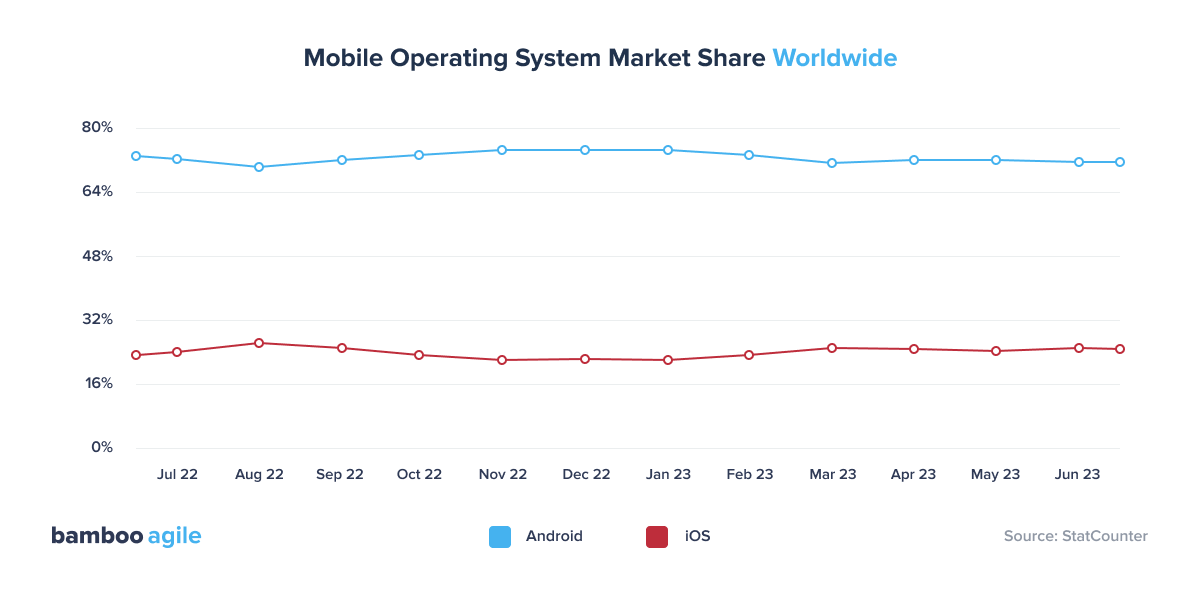
As of late 2025, Android holds roughly 73% of the global mobile OS market, powering an estimated 3.9 billion active devices worldwide. This share has stayed remarkably stable over the past several years.
Business of Apps gives some interesting insights into the current state of Google Play, Android’s official application store:
- Google Play accounted for 104.6 billion downloads in 2025. This is about 73.5% of all app and game downloads worldwide.
- Over the same year, consumer spending on Google Play reached $49.2 billion, up 13% year-over-year.
On a more general note, users spend an average of 3.6 hours a day on mobile apps globally, according to Sensor Tower. And that number has been rising year over year.
Cheap and easy deployment
Publishing apps on Google Play is a much easier process than doing so on the AppStore. For starters, it costs only $25 to deploy your first app. All the consequent releases will be free of charge. Since late 2023, new personal developer accounts must meet a closed testing requirement before it can go live to the public – at least 12 testers using the app for 14 continuous days. This adds one to two weeks to a first launch.
In contrast, publishing on the AppStore requires a yearly $99 developer license. It usually takes longer to review an app, and it can take up to 24 hours for it to get published after the approval. Apple is also extremely strict about what can and can’t be released on their official platform, so certain solutions may have a difficult time getting approved.
Google monetization support
From June 30, 2026, Google Play split its fee into a service fee and a separate 5% billing fee (only charged if you use Google Play’s own billing system). The service fee now depends on when a user first installed or updated your app relative to the rollout date in their region:
- Existing installs (before June 30, 2026): 25% once you pass $1M in annual revenue.
- New installs (on or after June 30, 2026): 20% at the same threshold.
- Below $1M revenue: 10% either way.
Developers meeting Google’s quality benchmarks under the Apps Experience or Games Level Up programs pay even less – 20% existing / 15% new.
Versatility
Part of what makes Android such a massive ecosystem is its versatility. It’s not tied to a single device like iOS and offers a lot more developer freedom. The system is very flexible and can be easily customized to suit almost any purpose or hardware.
Plus, when the market is this massive, it can be easier to find an audience even as a niche application.
Average Android app developer cost
There are plenty of factors that affect the android app development cost. The biggest one, however, is the development company’s location.
General regional pricing
Android app developer costs vary significantly throughout the world as do the average hourly wages. As a general rule, Asian countries and Eastern Europe provide cheaper Android development services, while Western European and US-based Android app developers cost more. Mind you, this does not necessarily reflect the quality of their Android products.
The most costly developers hail from the USA and Australia, charging $50-150 per hour, followed by British devs charging $80-100 and Western Europeans charging $72-84. Are they this expensive because of next-level quality? Not really.
The high costs are a direct result of high taxation. And while the ease of communication and similar time zones are worth the cost to some US and Australian clients, many turn to cheaper alternatives.
Eastern European and Indian companies are the most popular choices. Despite costing $25-50 per hour, Eastern Europeans provide quality services on par with Western competitors thanks to lower tax rates (for example, Estonia provides significant tax benefits to local IT businesses).
Indian programmers are the cheapest of the bunch at $8-30 per hour. However, it’s best to be cautious when choosing an Indian vendor, since the quality tends to be hit-or-miss. It’s highly advisable to have a tech lead to evaluate their work, as reliability and code quality can suffer at lower price points.
Average App Developer Rates Worldwide (in USD)
| United States | Australia | United Kingdom | Western Europe | Eastern Europe | India |
| $50-150/hr | $50-150/hr | $80-100/hr | $72-84/hr | $25-50/hr | $8-30/hr |
Regional pricing per specialist
Team composition also affects the price tag. The costs of hiring other necessary specialists also vary region to region. According to the Global Software Outsourcing Trends and Rates Guide, the distribution between continents is as follows.
Average Specialist Costs Worldwide (in USD)
| Position | North America | Latin America | Central & Eastern Europe | South Asia | Southeast Asia |
| Senior Developer | $143-172 | $65-82 | $68-76 | $41-49 | $34-41 |
| Intermediate Developer | $119-144 | $53-66 | $47-65 | $35-41 | $27-34 |
| Junior Developer | $75-91 | $41-53 | $35-53 | $25-36 | $21-35 |
| Business Analyst | $109-154 | $56-68 | $57-81 | $40-61 | $31-47 |
| Designer | $79-100 | $48-75 | $53-71 | $38-43 | $29-37 |
| Scrum Master | $121-153 | $54-79 | $61-74 | $44-50 | $48-59 |
| Intermediate QA (automated) | $125-151 | $48-62 | $43-63 | $29-39 | $25-35 |
| Intermediate QA (manual) | $104-126 | $42-59 | $41-59 | $29-32 | $22-32 |
Now that we have things like approximate hourly rates, taxes, and country-specific fees out of the way, we can start estimating the overall price of your Android project. To do that, we have to go through a list of other smaller (but no less important) factors.
What are the main Android app development cost factors?
First, consider what you want to achieve with your Android application. Your goals will determine the app’s functionality, its size, and level of complexity.
1. App size
The larger the app, the more time developers need to complete it – naturally, more features will result in higher prices. The size of an app is determined by the number of pages and features it has. App sizes can be roughly distributed into three categories.
| App size | Number of pages | Development cost |
| Small | Up to 6 key feature pages | $4,000-10,000 |
| Medium | Up to 11 key feature pages | $10,000-50,000 |
| Large / Enterprise | 12+ key feature pages | $50,000+ |
2. Application complexity
The complexity of your mobile application also majorly affects its development time. Depending on the type and intricacy of the app, the company might need to invest from 80 to over 700 hours into building it – that is, if we’re only talking about its basic code. An app with a complex backend that features many integrations can require over 1000 hours of development time, as well as a significantly larger team of specialists.
For example:
- A basic scheduling Android app will take about 80 hours to create, since it mostly consists of simple lists and menus, and can be constructed using templates.
- An e-commerce application will be more resource-intensive. It implies more sophisticated features, such as product listings, transactions, delivery, and shopping cart, as well as the help of UI designers. Overall, it could require over 300 hours of development.
- Something as ambitious as a messenger or a social network application can easily need 600+ hours of development time. Implementing cloud storage, various data formats, profile functionality, networking, newsfeeds, and other advanced features will require more than just copious amounts of time, but a team of extremely skilled professionals as well.
A simple breakdown of costs based on complexity will look something like this.
| App complexity | Examples | Development cost |
| Basic | Calculator, QR code scanner, photo editor | $10,000+ |
| Average | Online store, EdTech app | $60,000+ |
| Complex | Social media network, resource management system | $300,000+ |
3. App category
App categories aren’t absolute, but there’s definitely a price threshold typically associated with certain types of apps. Don’t take these estimates as gospel, but consider them during the initial budgeting phase.
| App category | Description | Development cost |
| On-demand services | Delivery apps, taxi apps, marketplaces. Usually require more than one application (i.e. separate app for customers, separate app for couriers), which will drive up the cost. | $20,000+ |
| Travel | Hotel and ticket booking, navigation, reviews, etc. | $25,000+ |
| e-Commerce | Online stores. Will require a lot of integrations, increasing the price. | $30,000+ |
| Healthcare & Fitness | Telehealth, health trackers, diet and exercise trackers, etc. Can be expensive due to the number of required sensor integrations. | $45,000+ |
| Finance | Digital wallets, payment processors, banking, etc. Will have a higher development cost due to extra security measures. | $60,000+ |
| Social media | Content sharing platforms, blogging platforms, messengers, etc. While the core features will not necessarily be difficult or expensive to develop, ensuring everything works and updates properly across various devices in a big interconnected system will be. | $70,000+ |
4. Native or cross-platform
Native apps are perfectly optimized to operate on a particular OS and provide a more polished user experience. Native Android apps are developed on Kotlin or Java. If you want to use the device’s hardware to the fullest and aren’t afraid of spending more money and resources, this one’s for you.
On the other hand, cross-platform development is a cheaper and faster alternative for those that wish to deploy on both the AppStore and Google Play. However, it comes at the cost of performance quality. Cross-platform apps are usually developed on Flutter or React Native.
A PWA (progressive web app) is an even cheaper option that provides an experience comparable to native apps.
| Native Android development | $50,000-$100,00+ |
| Cross-platform development | $10,000-$50,000 |
| PWA development | $40,000-$50,000 |
Read our guide to PWA development to learn more.
5. Payment model
Software developers tend to give customers a choice between two standard pricing methods: Fixed Price and Time and Material (T&M).
Fixed Price
The name is self-explanatory: the full price is set before the development cycle begins, and will not change regardless of what happens during the project’s implementation. This model is less stressful for the client, but it includes all possible losses and risks into its initial estimates; because of that, Fixed Price usually ends up being more expensive than the T&M approach.
T&M
T&M provides a rough estimate of what the full cost might amount to, but the actual price changes depending on how many resources are spent during development. This model is seen as riskier for the client, since they may need to cover some unforeseen costs. Nonetheless, given everything goes according to plan, Time and Material is the far more efficient option.
It’s especially advantageous for complex development projects. T&M is more adaptable, so it’s a safer choice when you’re not 100% certain about how many resources each aspect of the solution will require. Plus, not having to account for purely hypothetical losses and risks often results in significantly cheaper prices.
6. Number of integrations
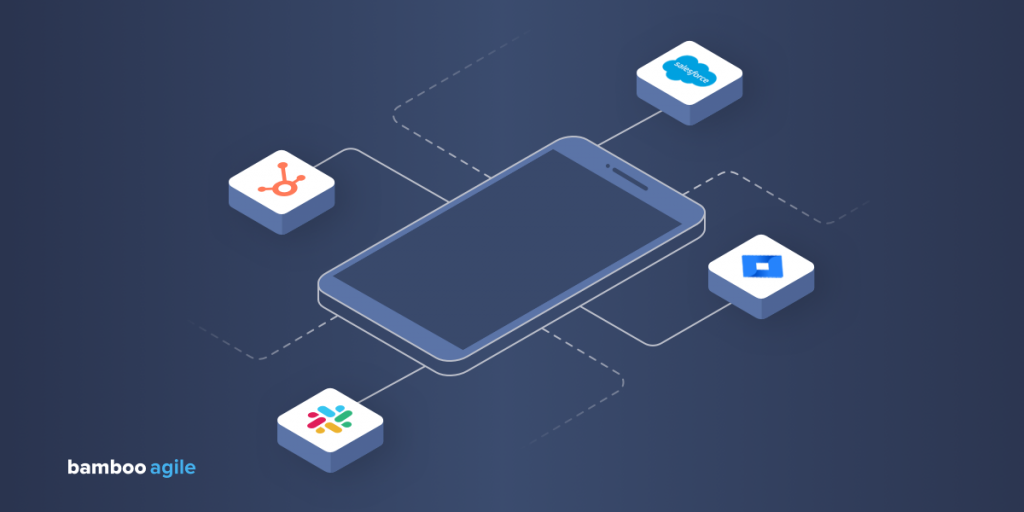
Another aspect that needs mentioning is whether your mobile application will have integrations or be self-sufficient. The latter is able to use the full array of its functionality without needing to connect to any external devices or databases. In the majority of cases, this is a much cheaper option.
However, some applications may require server-side integration to be viable; some apps have to integrate with CRM, HRM, ERM systems, and so on. Naturally, more integrations result in higher Android app development cost.
Third-party APIs
If you want to add functionality from a third-party service, you’ll need to integrate their API. These usually have a monthly price tag. Some of the most commonly implemented APIs are:
| Service | Functionality | API cost |
| Google Maps | Geolocation features, navigation, point-of-interest, street view | $200/month (but has flexible pricing) |
| ChatGPT | Smart chatbot functionality, AI-enhanced recommendations | $100-400/month (depending on the number of requests) |
| Login and signup integration, content sharing, invites | Free, but may require fees for certain types of requests | |
| Spotify | Controlling playback, creating and managing playlists, retrieving metadata | Free |
| Google Translate | Cloud machine translation | $20/month per million characters |
To add to that, the actual process of integrating a single third-party API will typically cost up to $1000. Luckily, that’s a one-time payment.
Payment processors
If your solution will support in-app payments, you will most likely need to integrate a payment processor. Here’s how the most popular options stack up.
| Payment processor | Transaction fee | Monthly service fee | Conversion rates |
| PayPal | 1.90-3.49% + fixed fee | None or $30 for PayPal Payments Pro | 3-4% |
| Stripe | 2.9% + $0.30 | None | 2% |
| Square | 2.5-3.5% + $0.10-0.30 | None or $29 for Square Plus | No conversion support |
Integrating one payment processor will usually add at least 50 hours of development time, costing anywhere from $1500 to $7500.
7. Data security
One of the primary concerns for businesses that are new to outsourcing app development is data safety. According to IBM’s 2025 Cost of a Data Breach Report the global average was $4.44 million. This is a slight improvement on the year before, driven mainly by faster detection.
Some extra security measures you may want to implement in your app will mark up the price, such as multiple user types with different permissions, multiple layers of encryption, and app security certificates.
Furthermore, certain functionality will need continuous funding after the app release. For example, 2-factor authentication will cost up to $10 per one user, per month.
8. Updates and maintenance
When you hire Android developers, that partnership will continue after the end product’s delivery. Companies like Bamboo Agile provide regular updates, bug fixing, and maintenance services years after the app’s initial release, thus ensuring its lasting relevance.
That said, maintenance and the frequency and size of updates will inevitably affect your overall spendings. Depending on the app, you may also need to invest into a reliable hosting service. The price of that will depend on the type and amount of content you plan to store on the servers.
| Maintenance | $5,000-$10,000 |
| Updates | Up to $50,000 |
| Hosting | Up to $320/month |
9. Other hidden costs
Hidden costs are not directly related to the process of software development, but need to be accounted for if you want to avoid unpleasant surprises. These include maintenance and hosting (which we’ve already discussed), marketing, licensing, notifications, and others.
App marketing in particular is a very important aspect to consider. In fact, it can potentially be one of the most expensive parts of the whole process. Business of Apps recommends dedicating at least $10,000 to marketing costs.
Notifications can also be quite costly, with some Push Notification services charging up to $250 a month.
| Factor | Description | Cost |
| Marketing | App market research, ASO (app store optimisation) tools, PR outreach, influencer marketing, etc. | $10,000+ |
| Licensing | First-time Google Play charge, software licences | $25-$400/month |
| Notifications | SMS notifications, Push notifications, email notifications, etc. | $20-$250/month |
How to reduce Android app development costs?
Watching your estimated project price get higher and higher isn’t the most encouraging thing in the world. But don’t be disheartened. There are several tried-and-true practices that will help you cut mobile development costs without sacrificing end product quality.
We consulted Natalia Pukhalskaya, Bamboo’s Business Analyst, on the best cost-saving tips in Android development.
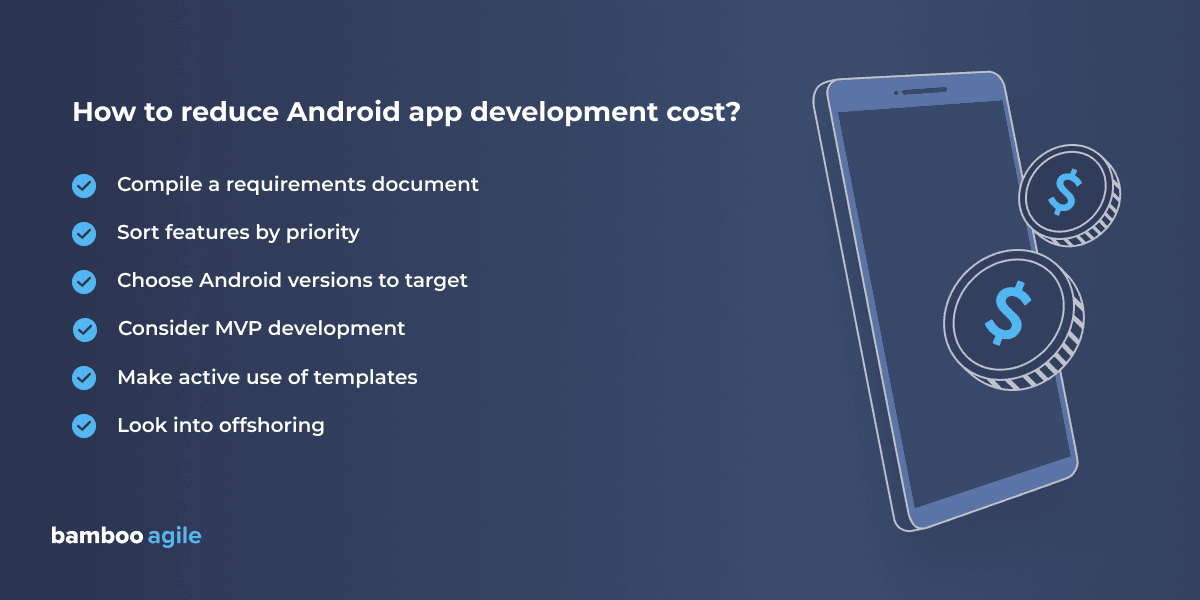
Compile a requirements document
‘Always keep in mind that saving costs starts with clear app requirements,’ says Natalia. ‘Thoroughly defined app requirements and functionalities before the development starts help to avoid unnecessary changes and reworks of any app you’d like to develop.’
A typical requirements document, a.k.a. software requirements specification, details the purpose of the solution and lists the precise specs, needs, and restrictions the devs need to follow. Competent software vendors will gladly help you with compiling it, but it’s advisable to have at least something of the sort prepared beforehand.
Sort features by priority
Understanding which features are essential to the app’s core functionality and which aren’t will definitely help you cut some unnecessary expenses. This concerns both original functionality and third-party integrations.
Natalia comments, ‘Thoroughly consider which integrations your app actually needs – payments, GPS, messengers, social media, and even connectivity with other devices such as sensors and smart watches. Just keep things simple. If you can do without an integration, don’t add it.’
Choose your Androids
Android fragmentation is another factor you want to consider. The OS is currently used by over 18,000 different device models, which makes accounting for every single possible system variation a costly endeavour.
‘Despite the fact that the average price of creating an iOS app is usually higher, testing for all the different Android versions will often result in higher costs,’ Natalia says. ‘With this in mind, I’d suggest defining your target Android devices and OS versions right away for the sake of lowering the quality assurance budget and reducing overall project costs.’
Go MVP
If you want to speed up your time-to-market and reach your first customers ASAP, look into MVPs. An alternative to full product development, MVP development is a significantly cheaper option that allows you to roll out an app for $50,000 or less.
The catch is, it can only contain its most essential functionality. You build the absolute minimum necessary to make your product useful to the target audience. Hence the name, Minimum Viable Product.
However, once the barebones version of your product becomes available to the public, you can start collecting feedback, gathering money from investors, and iterating on it. Eventually, you’ll end up with a fully-fledged solution that offers a robust set of features.
Don’t reinvent the wheel
It’s great to have an app that is unique, but sometimes it’s best to stick to conventions. Natalia advises paying close attention to the app’s UX design and defining what the solution is meant to look and work like in advance.
‘Users have certain expectations for standard features like buttons, navigation bars, or notifications – you need to meet those expectations,’ she says. ‘Android OS also has its own guidelines to make designers’ work easier and less expensive. So think of reusable components or open-source libraries that you can apply in your project.’
Consider offshoring
If you’ve read the regional pricing segment at the start of the article, you should already know what we’re getting at. The costs of living and taxes vary greatly from country to country, which makes outsourcing a very popular money-saving tactic.
Read more about the pros and cons of outsourcing in this article.
Can AI lower the cost of Android development?
AI tools cut costs in specific, narrow parts of Android development. They do not replace the judgment a senior developer brings to architecture, security, or long-term maintenance. The distinction matters for anyone building a budget in 2026, because the two claims get conflated constantly.
Where AI genuinely reduces cost
- Boilerplate and repetitive code: data classes, ViewModel scaffolding, Retrofit interfaces, basic Compose layouts.
- Unit test generation for well-defined functions.
- Code review support: flagging obvious null-safety issues, unused imports, style violations.
- Documentation and inline comments.
- First-draft UI translation from a Figma spec into XML or Compose, which a developer then adjusts.
In these cases, a competent Android developer with an AI assistant produces working code faster. That translates into fewer billable hours on low-complexity tasks, which is a real, defensible line item in a budget.
Where it does not
- Architecture decisions: choosing between MVVM, MVI, or a modular multi-module setup based on the app’s actual growth trajectory.
- Debugging production crashes tied to device fragmentation, memory leaks, or race conditions.
- Play Store policy compliance and review rejections, which change often and require current, specific knowledge.
- Backend integration edge cases: token refresh flows, offline sync conflicts, payment reconciliation.
- Performance tuning for a specific device tier or a specific user base.
- Anything requiring context about the client’s business logic that no training set contains.
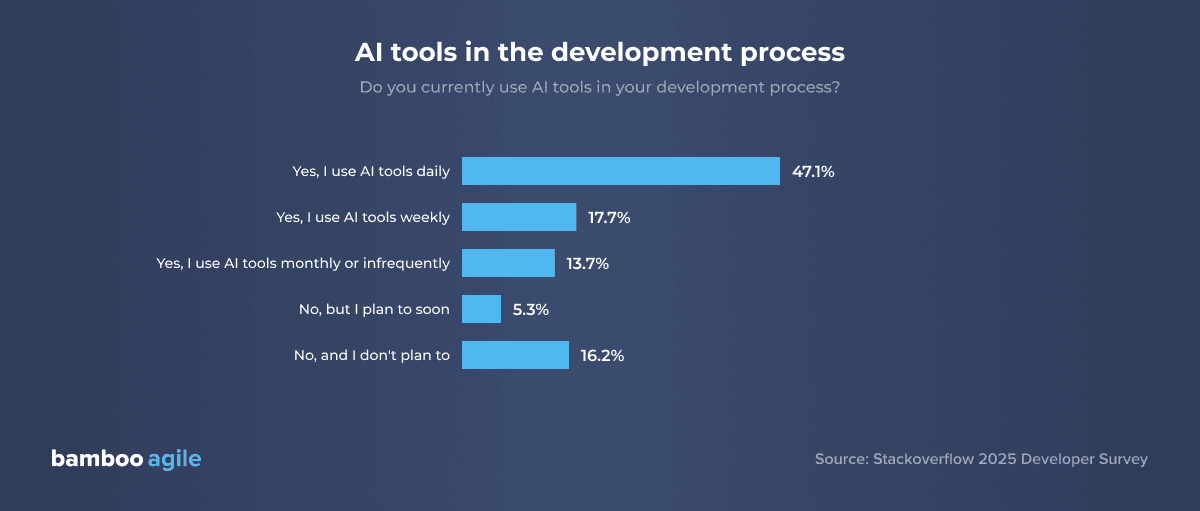
Stack Overflow’s 2025 Developer Survey, based on responses from close to 50,000 developers, found that AI tool usage climbed to 84% of developers using or planning to use AI tools, while trust in the accuracy of that output fell to just 29%.
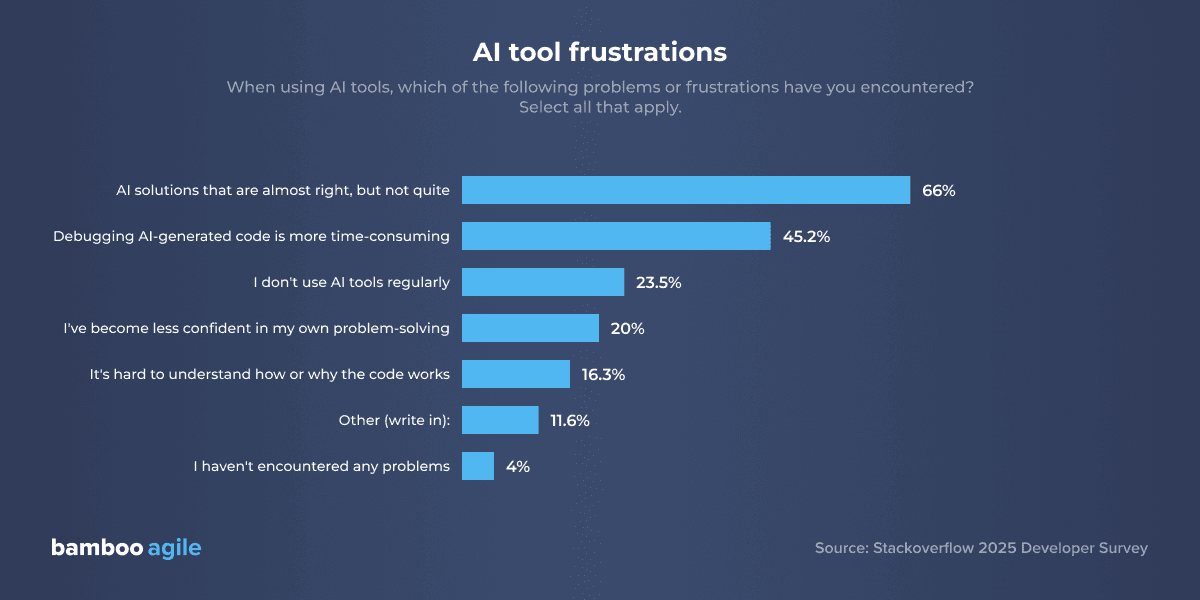
The top complaint, cited by 45% of respondents, was that debugging AI-generated code takes more time than writing it manually, largely because the code looks correct without actually being correct.
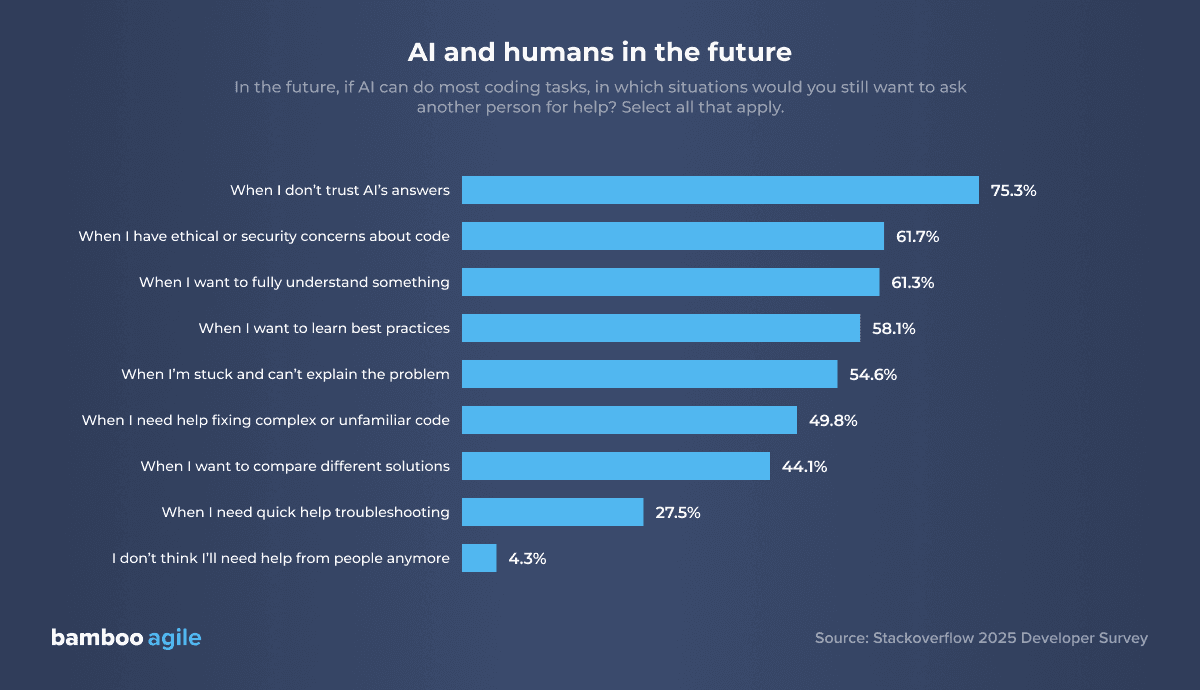
75% of developers said they would still turn to another person for help specifically when they don’t trust AI’s answer, which is the point where an experienced developer, not a tool, becomes the deciding factor in whether a feature ships correctly.
What happens when a company actually tries to replace the team?
The clearest documented example of ‘AI replaces the team’ going wrong is Klarna’s. In 2024, the company’s CEO stated publicly that AI had taken over the work of roughly 700 customer service employees. Quality declined, customers pushed back, and Klarna quietly brought human staff back. The CEO later acknowledged ‘the company had cut too far, too quickly and lost valuable human expertise.’
This wasn’t Android development specifically, but the pattern repeats in engineering organizations. Forrester Research’s Predictions 2026: The Future of Work report that half of the companies that cut jobs for AI-related reasons will end up rehiring for the same roles within a year. The cost saved on paper gets eaten by rework, quality control, and the cost of re-onboarding.
What this means for budgeting
AI is a productivity multiplier for a skilled developer, but not a substitute for one. A team that uses AI well can quote a lower price on well-scoped, low-complexity work. And that’s a legitimate reason your estimate might come in under a competitor’s manual-only quote. But if a quote looks unusually low across the entire project, including architecture, integrations, and testing, ask what’s actually generating that number. The parts of Android development that determine whether an app survives its first year in production are exactly the parts AI cannot yet do without a developer checking, correcting, and taking responsibility for the result.
Conclusion
Android app development cost is dependent on a variety of factors, including:
- development team location;
- application size, complexity, category, number of integrations and security measures;
- native or cross-platform development;
- vendor’s payment model;
- hidden costs (maintenance, updates, hosting, marketing, etc.).
The minimum possible total will be $5,000-$10,000, and the maximum can surpass $300,000. These costs can be reduced in a number of ways, which include prioritizing features, choosing which versions of Android to target, using templates, and choosing MVP development, among others.
About Bamboo Agile
Bamboo Agile is a software development boutique located in Tallinn, Estonia. With over 20 years of expertise behind its back, the team has mastered the domains of Telecom, Healthcare, Education, ERP, Finance, and others.
The team works with Kotlin and Java on top of Android Architecture Components, Coroutines, Dagger, and Retrofit, and builds backend services in Node.js, .NET, and Java – which matters for the cost conversation, since a stack that supports clean modularization is cheaper to extend later than one that gets patched together.
Security is treated as a built-in requirement rather than a post-launch fix, and every release goes through QA on physical Android devices instead of emulators alone, which is the kind of practice that keeps the ‘hidden costs’ section of a budget from turning into a surprise after launch.
If you still feel unsure about your Android app development cost, don’t hesitate to reach out for a free consultation with our experts – we’ll be happy to help.