Bamboo Agile | Bespoke software development company
Bamboo Agile is an Estonia-based custom software development company that crafts bespoke solutions for telecom, education, healthcare, finances, other sectors.
In 2026, AI has spread evenly across organizational tasks. Employees use chatbots for questions or drafting emails, developers employ it for speeding up coding and testing.
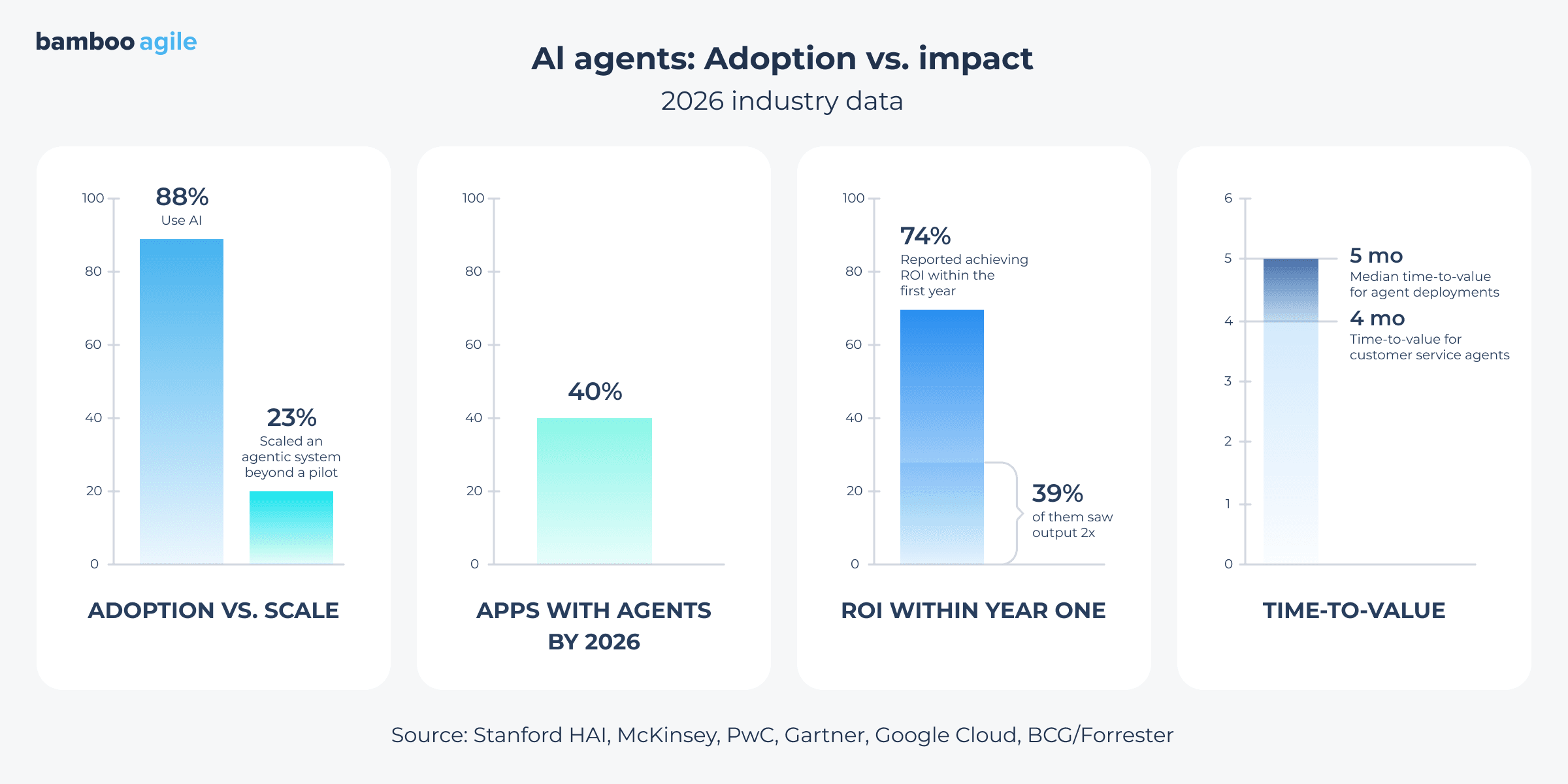
In fact, 88% of organizations now use AI in at least one of its business functions – up from 78% a year earlier (The 2026 AI Index Report, Stanford University). However, use does not mean deployment. McKinsey puts the number of organizations that have scaled an agentic system beyond a pilot at 23 percent. PwC frames the same gap from the other direction – 79 percent of companies say they have adopted agents in some form, and of those, 66 percent report measurable value back.
But if companies are employing AI left and right, what prevents them from AI agent integration? The technology is definitely there, but the understanding of how it works and what it delivers remains a mystery.
Having worked with AI agents before, our team at Bamboo Agile has compiled this article to give you an overview of the mechanics behind the integration and share the next steps to act on.
What is AI agent integration?
AI agent integration connects an AI agent to your existing systems – CRM, ERP, databases, internal APIs, and more. The agent reads data and makes decisions, then triggers actions inside those tools without waiting for a person to step in. If the integration is done right, the agent behaves like a new hire who already knows your systems.
Why it matters now
Interest in AI agents has been growing steadily. Gartner says 40% of enterprise applications will embed a task-specific AI agent by the end of 2026. Few enterprise technologies have moved that fast. Yet, what catches attention is the speed of adoption. Companies that used to run pilots in 2025 are now shipping agents inside production software.
Google Cloud’s 2025 ROI of AI report has a number that supports the importance of AI agent integration services. According to the report, 74% of executives whose organizations deployed AI agents in production reported achieving ROI within the first year. Among those noting productivity gains, 39% saw output at least double. Most companies in the survey were already collecting that return.
Finally, payback is arriving faster than most capital projects a company would normally greenlight. BCG and Forrester put the median time-to-value for agent deployments at roughly five months. Customer service agents reach positive ROI in a little over four months, according to their 2026 surveys. At that pace, an agent funded this quarter can be paying for itself before the next budget cycle even opens.
Real-world examples
Numbers make the case for agent integration in the abstract, but real deployments show what the work actually looks like once an agent touches production systems. Two recent examples below are worth studying.
Stanford’s Biomnishows what integration looks like at genuine scale. Stanford researchers built an agent that connects more than 150 bioinformatics tools, 59 databases, and over 100 software packages into one research environment. First, a scientist submits a request. Then, the agent plans and executes the work, and documents every step for review. So far, more than 15,000 scientists ran roughly 100,000 workflows through it in nine months.
Visa and ChatGPToffer a different kind of integration story, one that reaches into a live payment network. In June 2026, Visa connected its payment infrastructure to ChatGPT. This GenAI-powered agent can now compare products across any merchant on Visa’s network and complete a purchase without a person touching a checkout page.
How AI agent integration works: The architecture
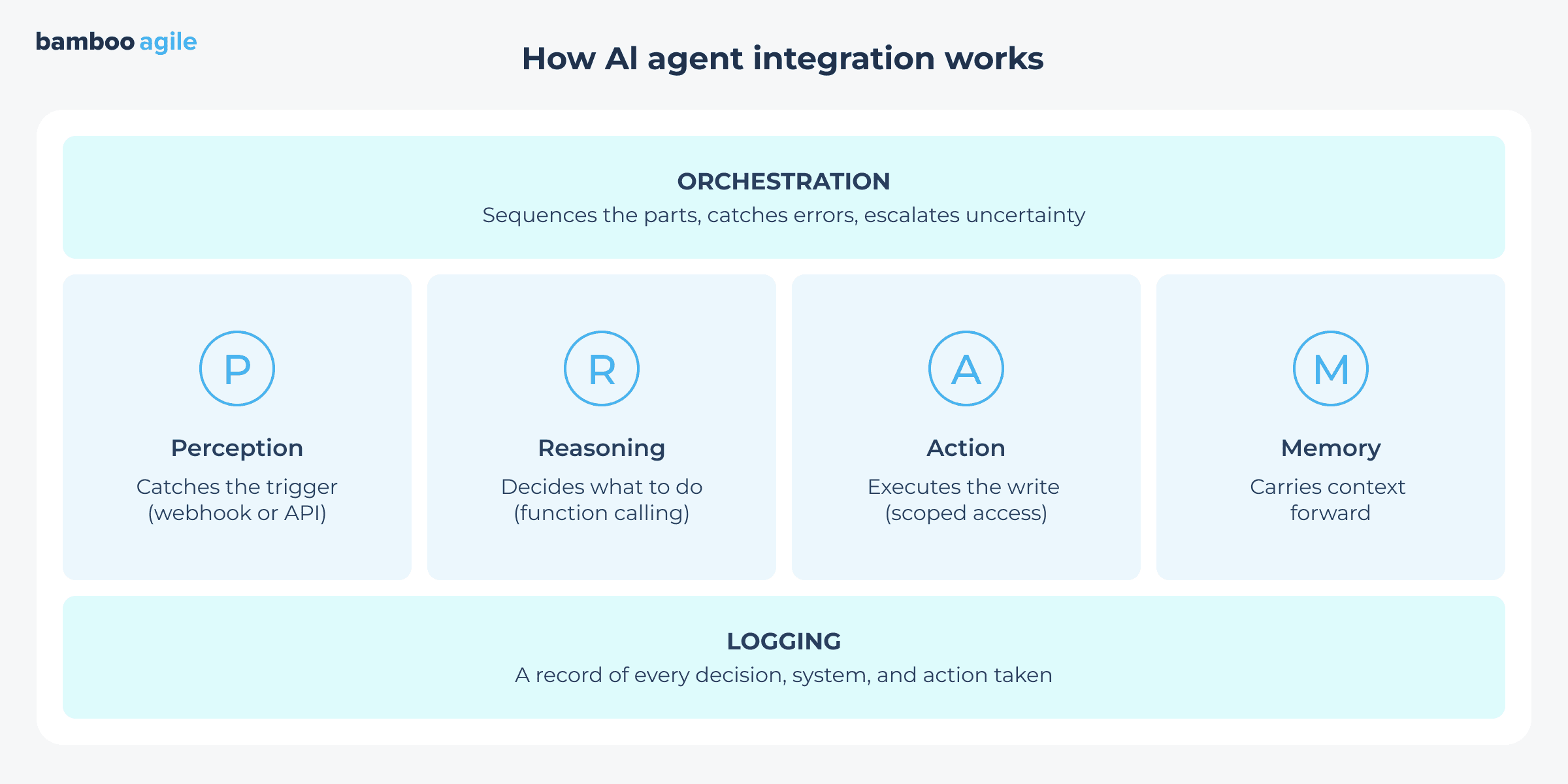
To have an idea of how AI agent integration architecture is designed, you need to answer four questions:
How does the agent know something happened?
What does it decide to do?
How does that decision turn into a real action?
How does it remember any of this the next time around?
Perception catches the trigger. A ticket comes in or a field changes in the CRM – something has to alert the agent before it can respond. Most integrations handle this through webhooks or APIs. They push a notification the moment an action happens.
Once perception catches the signal, reasoning takes over and decides what to do with it. To do so, a backend call sends the situation to a language model – along with a system prompt that defines the agent’s role and limitations. It also includes a schema listing exactly which functions it is allowed to call. The model reads all of this and returns a structured request that names which function to run and with what arguments. On your end, code executes it, and the result often gets sent back to the model for another round before it settles on a final answer.
When reasoning settles on a decision, something needs to carry it out. That brings in action. This part handles the writes, like updating a record or sending an email. It uses the same APIs perception relies on. At this stage, two things deserve attention. First, the agent should hold only the access its specific job requires. Second, the system needs to recognize a retry, as a dropped connection should never trigger a duplicate charge or a duplicate email.
None of the first three parts hold up over time without the fourth – memory. A language model forgets everything between calls unless something feeds the history back in. Recent conversation usually gets passed along directly. At the same time, older information tends to live in a vector database and gets pulled back only when relevant. An agent can then recall something from weeks earlier without every prompt carrying the full record.
An orchestration layer ties these four parts into a working sequence. It manages the order of operations and catches errors, as well as routes anything uncertain to a person.
Additionally, there is one more layer that sits above all – logging – as every decision the agent makes needs a record someone can pull up later, whether it is a client or a regulator. When you add it, the agent becomes a system your team can trust and maintain.
Key integration approaches
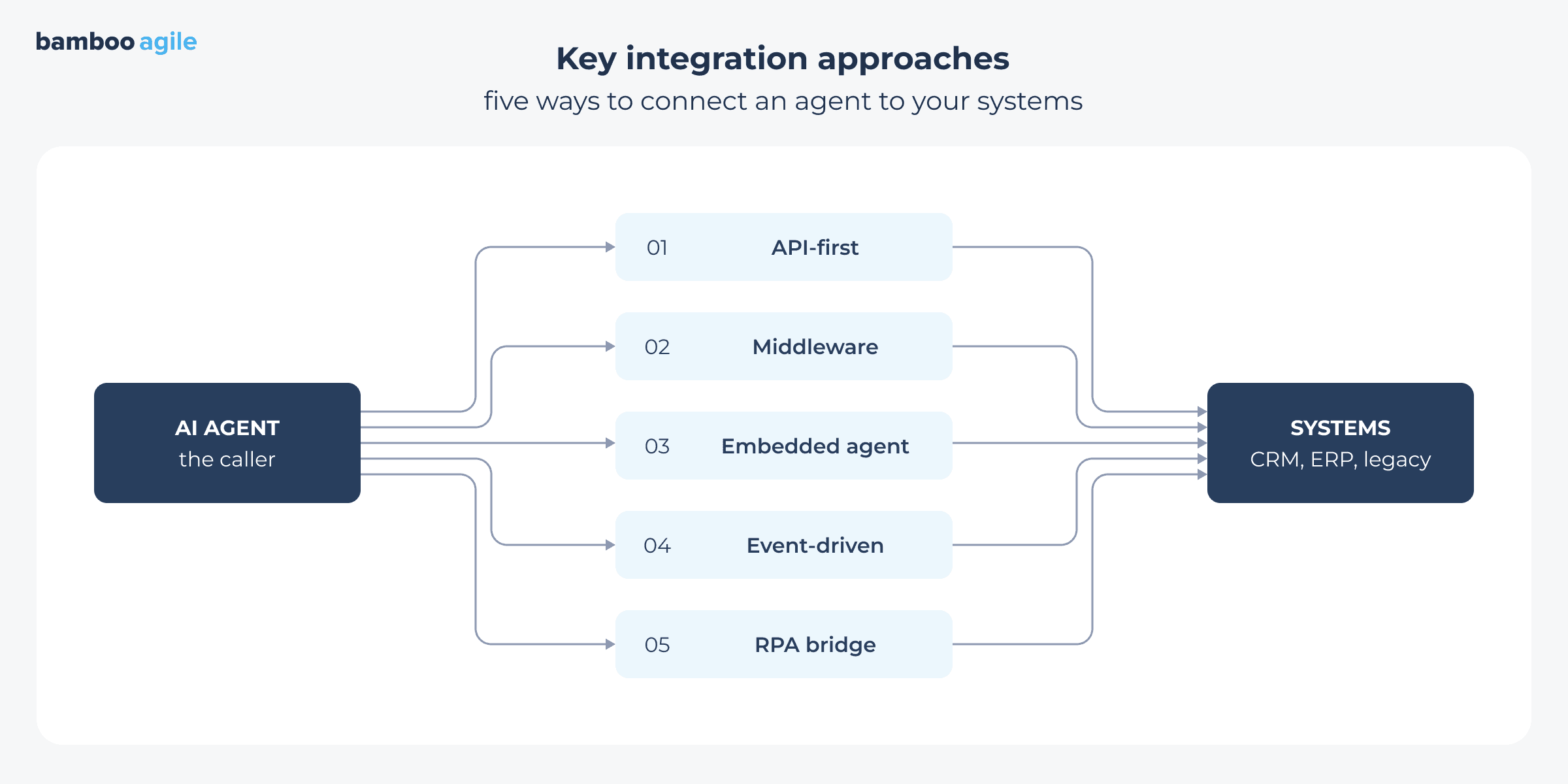
There is no single way to plug an AI agent into a business. In this case, the right fit depends on a variety of factors, like what your systems already expose and how fast you need results. That is why AI agent integration platforms come in different flavors rather than one standard shape. The five approaches below cover most of what is being deployed today.
API-first integration
Usually, AI agent deployments start here. API-first integration means the agent talks to your existing systems through APIs, or the usual channels software uses to exchange data. This is the most common path for AI agent integration with CRM systems: an agent set up to tackle sales-related tasks might pull a customer record from Salesforce, check stock in the ERP, and assemble a price quote.
When those APIs are well documented, setup is fast and monitoring is easy, as every agent action leaves a traceable call. But when the APIs are old or inconsistent – pretty common in systems that have been running for a decade or more – that same work drags out and usually blows the budget. That is why it is worth auditing what your systems actually expose before you write a line of code.
AI agent integration middleware and orchestration layers
Sometimes an agent needs to talk to five or six systems that were never designed to work together. If you connect to each one directly through its own API, your solution can turn into a mess of custom code. Middleware fixes that as it sits between the agent and all those systems as one translation layer. Platforms like MuleSoft or Zapier, or a custom orchestration service take the agent’s request, translate it into the appropriate format, and then handle logins and permissions in one place. The benefit comes later: when a business adds a new system or swaps one out, the team updates the middleware layer and leaves the agent’s logic intact.
Embedded agents inside existing platforms
Some vendors skip the connection step entirely and build the agent straight into their software. As an example, Salesforce has Agentforce and Microsoft has Copilot. Because the agent’s already inside the tools your team uses, setup takes days instead of the months a custom integration usually eats. Where is the catch, though? It lies in the fact that you only get as much flexibility as the vendor gives you. That works fine for common, well-worn workflows – standard customer support tickets, for instance. But if your business does anything out of the ordinary, you can hit that ceiling fast. This is exactly where purpose-built AI agent integration tools start to make more sense. In the end, they are designed for the specific stuff that off-the-shelf agents cannot handle.
Event-driven integration
An event-driven agent watches for a request. A support ticket lands, a payment fails, or maybe stock dips below a threshold; it acts. Under the hood, this runs on message queues and event buses: Kafka, RabbitMQ, or their cloud equivalents from AWS, Google, and others. Those carry the signal from one system to the agent in real time.
As an illustration, manufacturers use this to track supply chains as conditions shift. Support teams route tickets to the right person the second they come in. The upside is speed, since there is no delay waiting for someone to trigger the action. But the tradeoff is that this setup takes more planning upfront. Your team needs to define exactly what counts as an event and how the system handles failures when something goes wrong.
RPA as a bridge
While AI agent integration is taking off, many large organizations still run on systems that were never built with APIs at all – think mainframes or older desktop software. In fact, McKinsey mentions that Fortune 500 companies use as much as 70 percent of the software that is 20 or more years old.
Robotic process automation, or RPA, lets an agent drive these systems the way a person would – clicking buttons, typing into fields, and reading whatever shows up on screen. In practice, it is less reliable than an API connection, because even a change in the screen layout may break the whole workflow. Even so, if you decide to go for it, then it buys your company time to build a proper API layer underneath.
The main challenges of integrating AI agents
MuleSoft’s 2026 benchmark found that only about 27% of enterprise agentic applications are actually connected. That means an agent can go live and still have almost nothing to work with. What causes the gap? We have compiled a table that shows the main AI agent integration challenges – and what you and your team can do to solve them.
Challenge
How to solve it
Legacy systems that fail to talk to modern APIs
Add a middleware layer that translates between old protocols and new ones. Do not rebuild the core system from scratch.
Data spread across disconnected silos
Set up a data layer or API gateway that gives the agent one consistent view of information before it goes live.
Security teams worried about agent access
Give agents role-based permissions and a sandbox to test in first. Log every action so you have a full audit trail. Most importantly, study AI agent integration security best practices and implement them from the get-go.
Little insight into why an agent made a decision
Add logging and human review at the decision points that matter.
Compliance questions from legal or regulators
Loop legal in during design. Pick vendors that already hold the relevant certifications.
Staff who do not trust or want to use the new tool
Train your team on real use cases from their own work. Let one department pilot the agent before a company-wide rollout.
Rules of thumb for successful AI agent integration
Before you greenlight a project, we suggest running it against these checkpoints:
Start with one process, not the whole company. Pick a single workflow with an outcome that is easy to measure, like ticket routing or invoice matching. Prove the value there before you touch a second system.
Map the data before you map the architecture. Know where the information lives, who owns it, and how transparent it really is.
TreatAI agent API integrationas the real budget item. Some systems connect in a day. Others need custom middleware, and that work often costs more than the agent itself. Price it out early.
Keep a human in the loop until the agent proves itself. Build a checkpoint for anything irreversible – refunds, contract approvals, and others.
Plan for failure before launch. Decide what happens when the agent gets a low-confidence result or hits a system outage. A fallback path matters as much as the happy path.
Log everything. That is for debugging, and for the day someone asks “why did it do that?” – someone will.
Involve the team that owns the process. The people who run the workflow today can spot edge cases no AI agent integration diagram will show you. Make sure to bring them in during design.
Set a review routine. Agent behavior drifts as your systems and data change. Put a recurring check on the calendar. Monthly may be a reasonable starting point.
How to get started
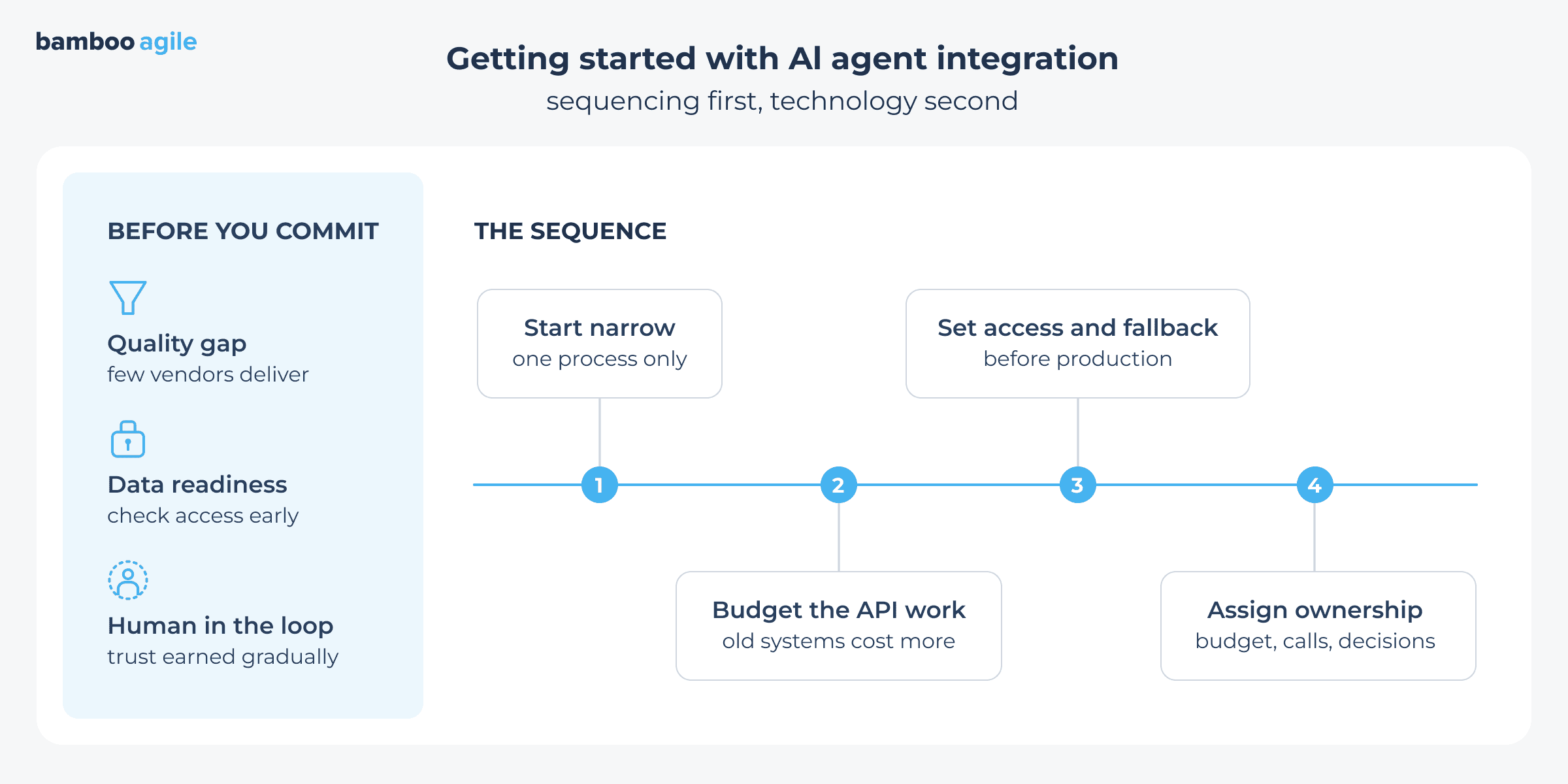
Getting your AI agent live is mostly about sequencing. As we mentioned above, the good idea here is to start with one narrow process. Budget real time for the API work, because older systems almost always cost more than the model itself. Then, settle access rules and fallback paths before anything even touches production.
What is also necessary is to have the ownership conversation. Who owns the decision? Who owns the budget? Who gets called when something goes astray?
Once that is settled, the technical path opens up fast. A straightforward API build or middleware for systems that never expected a machine to log in – all of them get easier to choose once someone is accountable.
Bamboo Agile sits in on that first conversation with clients all the time, long before any build starts. If you need to figure out the point where to start, talk to our team.
How fast is the AI agent space moving? Incredibly fast. Analysts are already tracking billions flowing into the AI agent market, and that pace tells you most of what you need to know. But here is what clients need to understand first. The number of companies offering agent integration has exploded, and only a small fraction actually deliver quality work. Most are repackaged chatbots with a new logo. On top of that, there is a massive gap betweenadoptionandproduction. A large share of implementations gets abandoned or never reaches a working state. That is the real budget disappearing into nothing. So before committing, weigh whether you are actually ready. Not just financially, but in your ability to track risk at every stage of rollout. Just as critical: know in advance exactly what data the agent will need. I have watched projects stall mid-implementation because internal security policy simply would not allow it. That is how a project ends up abandoned. Last point. Never skip human-in-the-loop. “Replace my whole department with an agent” is not a realistic task. Agents make mistakes, and some of those mistakes have real consequences. Trust gets earned gradually as the agent proves itself. A human always stays in the loop.
Ready to see what AI agent integration looks like for your systems?
Bamboo Agile can map your stack and scope a low-risk pilot.
A chatbot answers questions inside a narrow scope that is always scripted. An agent, by contrast, plans a whole sequence of steps and calls outside tools to finish a task. Where a chatbot waits for the next prompt, an agent might do a sequence of actions – check stock, place an order, then send a confirmation email on its own.
What is MCP in AI agent integration?
MCP (Model Context Protocol) is an open standard that lets an agent talk to outside tools and data sources through one interface – no custom code required for every connection. Instead, a team builds one MCP connector and reuses it across models and vendors.
How do you secure AI agent integrations?
Security starts with limits on what an agent can access and do. In practice, that means scoped permissions rather than full admin rights. From there, logs capture every action. High-risk steps wait for human approval, and data stays encrypted in transit and at rest. On top of that, vendors test in a sandbox before an agent touches production, so mistakes can surface early.
What are the best solutions for integrating AI agents?
In reality, no single platform fits every case. The right choice depends on your stack and your industry, as well as how much risk you can accept. Options run from open frameworks like LangChain or Semantic Kernel to managed platforms from Microsoft, Salesforce, or AWS. Plenty of companies, though, land on a mix: an off-the-shelf orchestration layer plus custom connectors for a proprietary system.
How long does AI agent integration take?
A narrow pilot, one agent connected to one system, can go live in as early as two to four weeks. However, a company-wide rollout is a different story. Once security review, testing, and change management enter the picture, the project usually runs three to six months across multiple departments and legacy systems. Either way, the timeline depends more on data readiness and how fast your internal approvals move than on the technology itself.
Darya has over 10 years of experience in the IT sector and specializes in producing clear, research-driven content for technology and business audiences.
At Bamboo Agile, she authored numerous articles covering emerging technologies, digital innovation, and industry-specific solutions, helping readers navigate complex industry developments. Darya collaborated closely with subject-matter experts to ensure accuracy and reliability of her works.
We use cookies to analyze user behavior and improve the website for you. Check our Privacy Policy for more information.
Functional
Always active
The technical storage or access is strictly necessary for the legitimate purpose of enabling the use of a specific service explicitly requested by the subscriber or user, or for the sole purpose of carrying out the transmission of a communication over an electronic communications network.
Preferences
The technical storage or access is necessary for the legitimate purpose of storing preferences that are not requested by the subscriber or user.
Statistics
The technical storage or access that is used exclusively for statistical purposes.The technical storage or access that is used exclusively for anonymous statistical purposes. Without a subpoena, voluntary compliance on the part of your Internet Service Provider, or additional records from a third party, information stored or retrieved for this purpose alone cannot usually be used to identify you.
Marketing
The technical storage or access is required to create user profiles to send advertising, or to track the user on a website or across several websites for similar marketing purposes.