
What is an e-Learning app in 2026?
e-Learning apps serve a large market that extends beyond schools and institutions. Their primary purpose is to make education simpler and more accessible. Almost anything can be considered education – employee training programmes, hobby courses, or one-on-one classes with private tutors.
Educational apps provide numerous advantages to both students and teachers. Students, for example, can use mobile e-Learning apps on various devices to access courses and training materials online at their leisure. Teachers can pre-record lectures and distribute them online, as well as review their students’ grades and progress.
The development of e-Learning apps is also advantageous from a financial aspect for all types of organisations.
Companies may onboard new staff quicker by developing training on corporate platforms. Employees will spend less time looking for the best training tools and will learn faster. Plus, when a company displays interest in its employees’ professional development, it helps them feel appreciated. This results in enhanced productivity and employee retention.
Current e-Learning market overview
The most crucial thing to understand about e-Learning apps is that they are not limited to educational establishments.
Corporate training drives a large share of demand, and AI is changing how that training gets made. According to LinkedIn’s 2025 Workplace Learning Report, 71% of L&D professionals are exploring, experimenting with, or already integrating AI into their work.
Estimates of the total market vary by research firm and by what each one counts. IMARC Group, for example, estimates in its 2026 market report that the global e-Learning market reached $369.7 billion in 2025.
The market is also consolidating. In May 2026, Coursera completed its all-stock merger with Udemy, and the combined company reaches more than 290 million learners, Axios reported.
The industry has changed a lot over the past few years. Generative AI moved from experiment to standard feature, phones became the default place to study, and regulators started writing rules aimed at learning software. The trends below explain what learners and buyers now expect from a new e-Learning product.
Key trends shaping e-Learning apps in 2026
Rise of personalized learning with AI
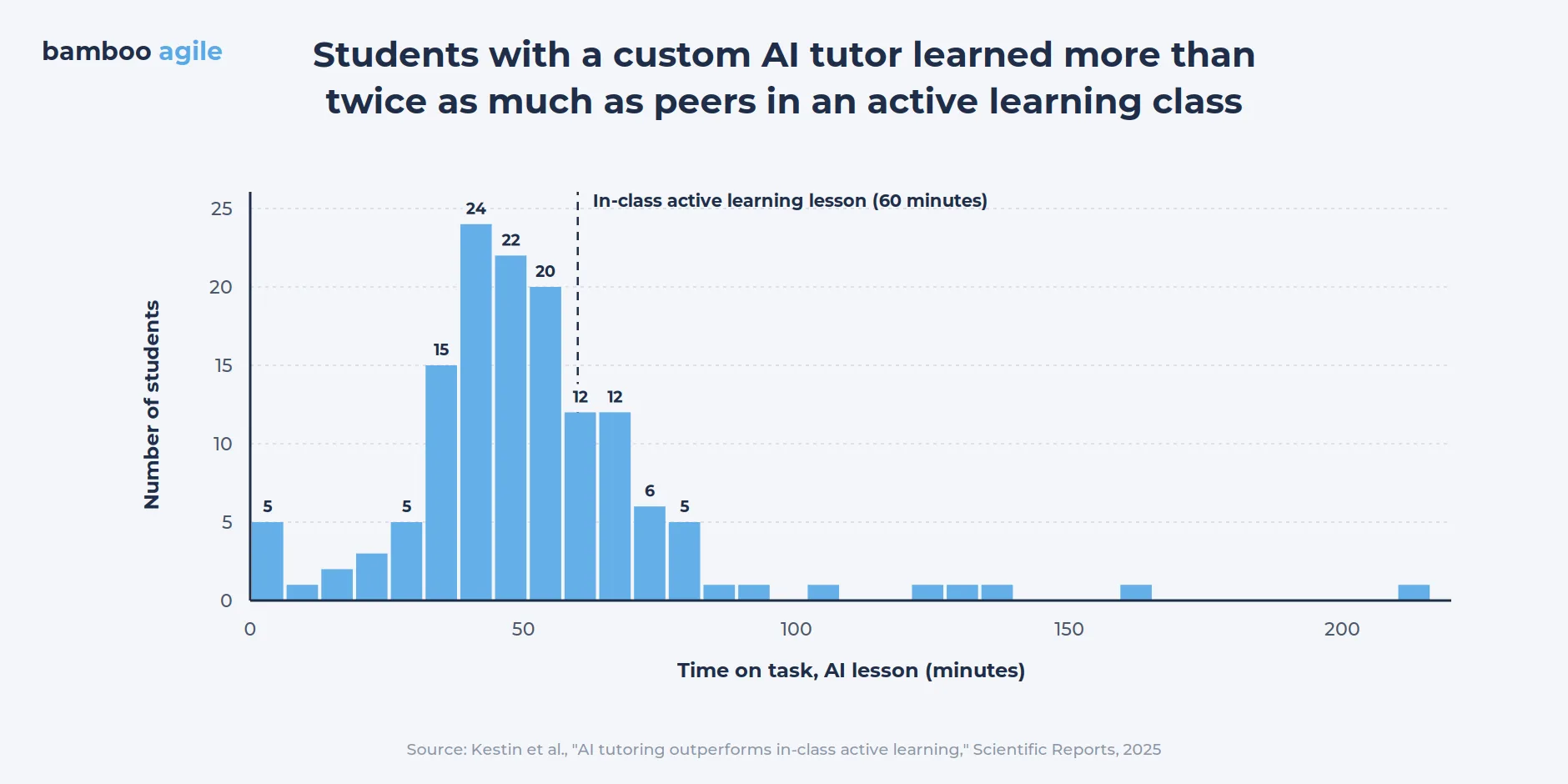
Over the past several years the biggest change has been generative AI tutors that hold a dialogue with the learner instead of just picking the next exercise. The evidence is encouraging when the tutor follows sound teaching methods. In a randomized trial at Harvard published in Scientific Reports (2025), students who studied with a custom AI tutor learned more than twice as much as peers in an active learning class, and in less time.
Let’s take a closer look at how AI is already being actively used for various tasks in e-Learning.
AI tutors that teach instead of answering
The first wave of AI in learning apps simply answered questions. The current wave holds the answer back and guides the learner toward it with questions, hints, and short checks. OpenAI built ChatGPT’s study mode around this idea in July 2025, and Google released a similar Guided Learning mode in Gemini a week later.
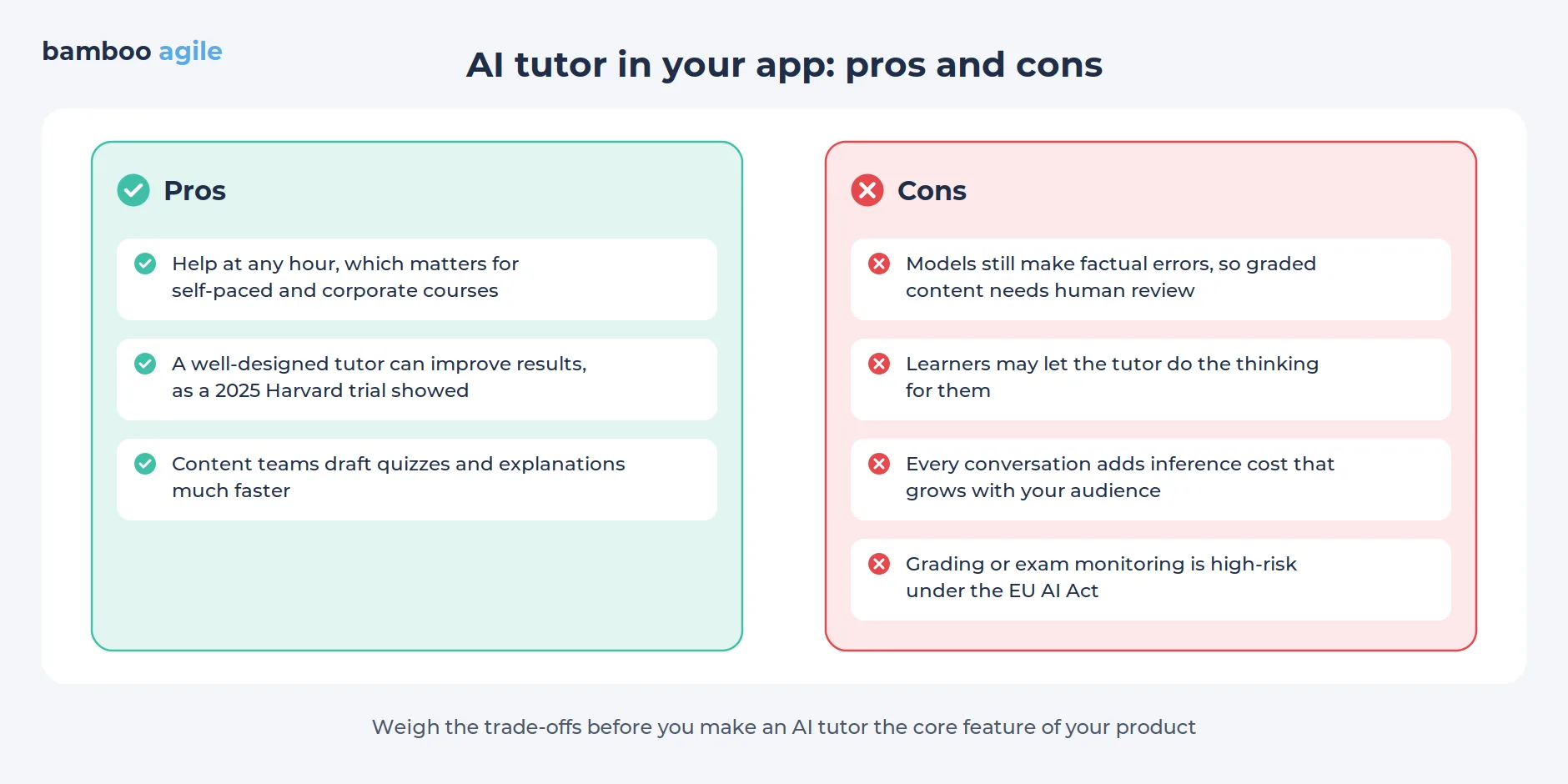
So here the design rule is that the tutor should make the learner do the thinking. That choice, more than the model behind it, is what probably produced the strong results in the Harvard trial.
Voice practice and AI conversation partners
Speech models are now fast enough for natural back-and-forth, and language and communication apps are building around them. Duolingo introduced Video Call at Duocon 2024, a feature that lets Max subscribers talk in real time with an animated AI character.
In January 2025, the company brought it to Android and added more languages. Duolingo’s own pitch is that an AI partner gives learners a low-pressure place to speak out loud before they try it with people.
AI role-play for workplace skills
In 2025, Coursera introduced Role Play, a course activity in which learners rehearse workplace conversations with AI personas that respond in real time. Instructors set the scenario and the goals, so practice stays tied to the course. For L&D teams, this makes soft skills practice far cheaper to scale, because live role-play with a coach is hard to run for thousands of employees.
AI-assisted course creation and localization
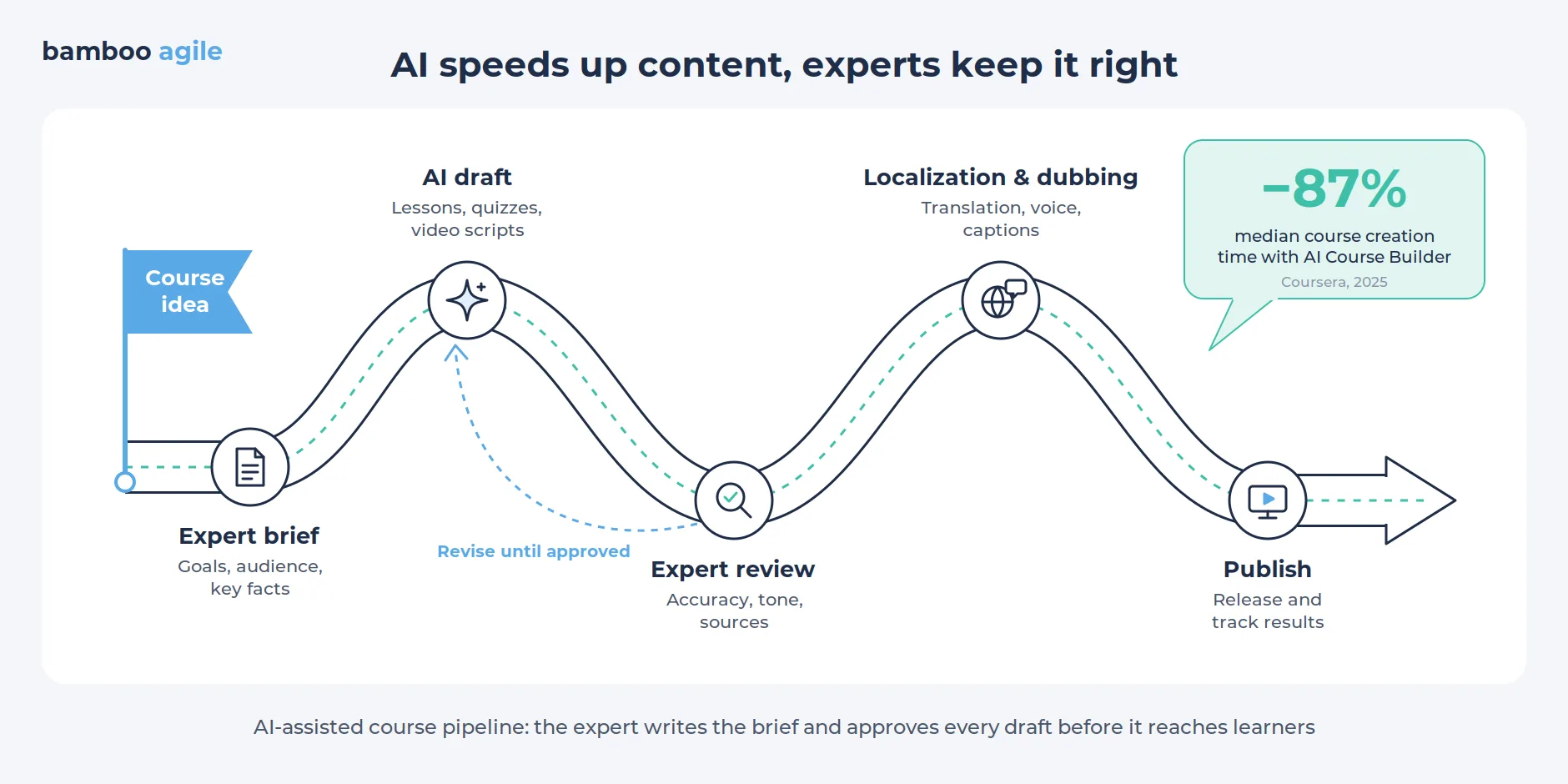
Content production, long the slowest part of launching a course, has sped up the most. In 2025 Coursera reported that its AI Course Builder cut median course creation time by 87% for enterprise customers.
Video is moving the same way. Synthesia, which turns scripts into training videos with AI avatars, raised a $200 million round in January 2026 and plans to add interactive avatars that answer employee questions during training.
For an e-Learning app, the takeaway is to consider building authoring tools where experts review and approve AI drafts instead of writing everything from scratch.
AI built into the LMS
Schools and companies now expect AI inside the platform they already use. In July 2025, Instructure and OpenAI announced a partnership that lets teachers create AI-powered assignments directly in Canvas. Student conversations stay visible to the instructor, and learning evidence goes back to the gradebook. At the same event, Instructure introduced IgniteAgent, a conversational assistant meant to work across Canvas.
In case you sell to institutions, expect three questions from buyers: how your AI features plug into their LMS, who can read the conversation logs, and whether student data leaves their environment.
Focus on mobile learning
Mobile devices have become a part of our everyday lives, so e-Learning app developers are catering to this trend by designing their platforms for phones first. Mobile-friendly apps provide convenient access to learning content, assessments, and support features. Learners can pick up a lesson at their own pace and from anywhere.
Duolingo shows how far a phone-first product can go. The company reported 58.7 million daily active users in its Q2 2026 shareholder letter, up 23% from a year earlier.
Increased collaboration and social learning
e-Learning apps are encouraging collaboration and social learning among students. Features like discussion forums, online communities, and interactive group projects promote peer-to-peer learning and give learners a sense of community, which keeps them coming back.
Data-driven analytics
e-Learning apps use data analytics to gain insights into learner behavior, preferences, and performance. This data-driven approach enables personalized learning recommendations and course adjustments to optimize the learning experience.
That said, analytics always come with obligations. Apps that track children’s data or use it to evaluate students fall under the rules covered later in this article.
Microlearning at the center of attention
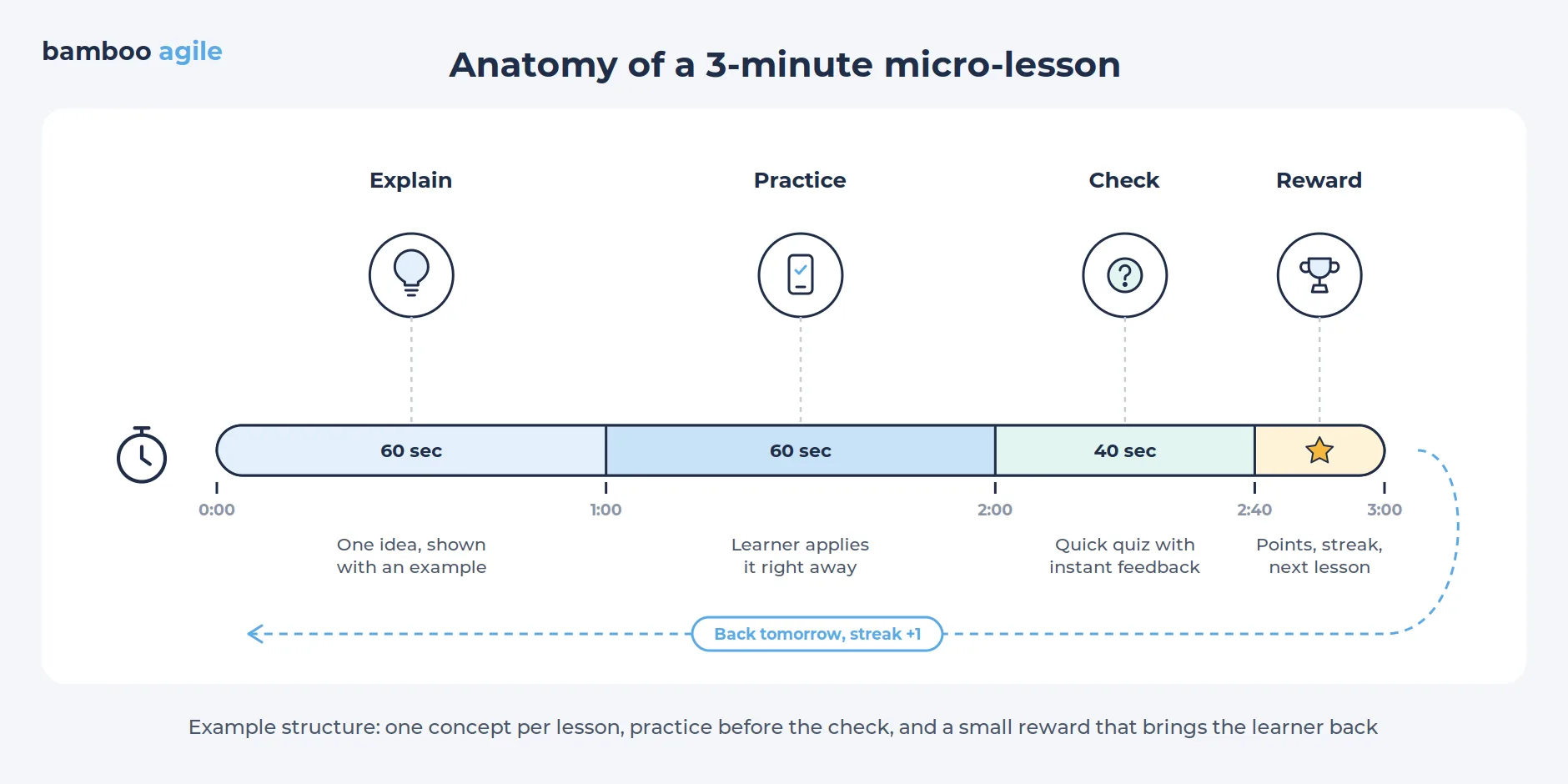
Microlearning, which involves delivering short, focused learning modules, has gained popularity in recent years. This approach caters to modern learners’ preferences for bite-sized, digestible content that fits into a commute or a coffee break.
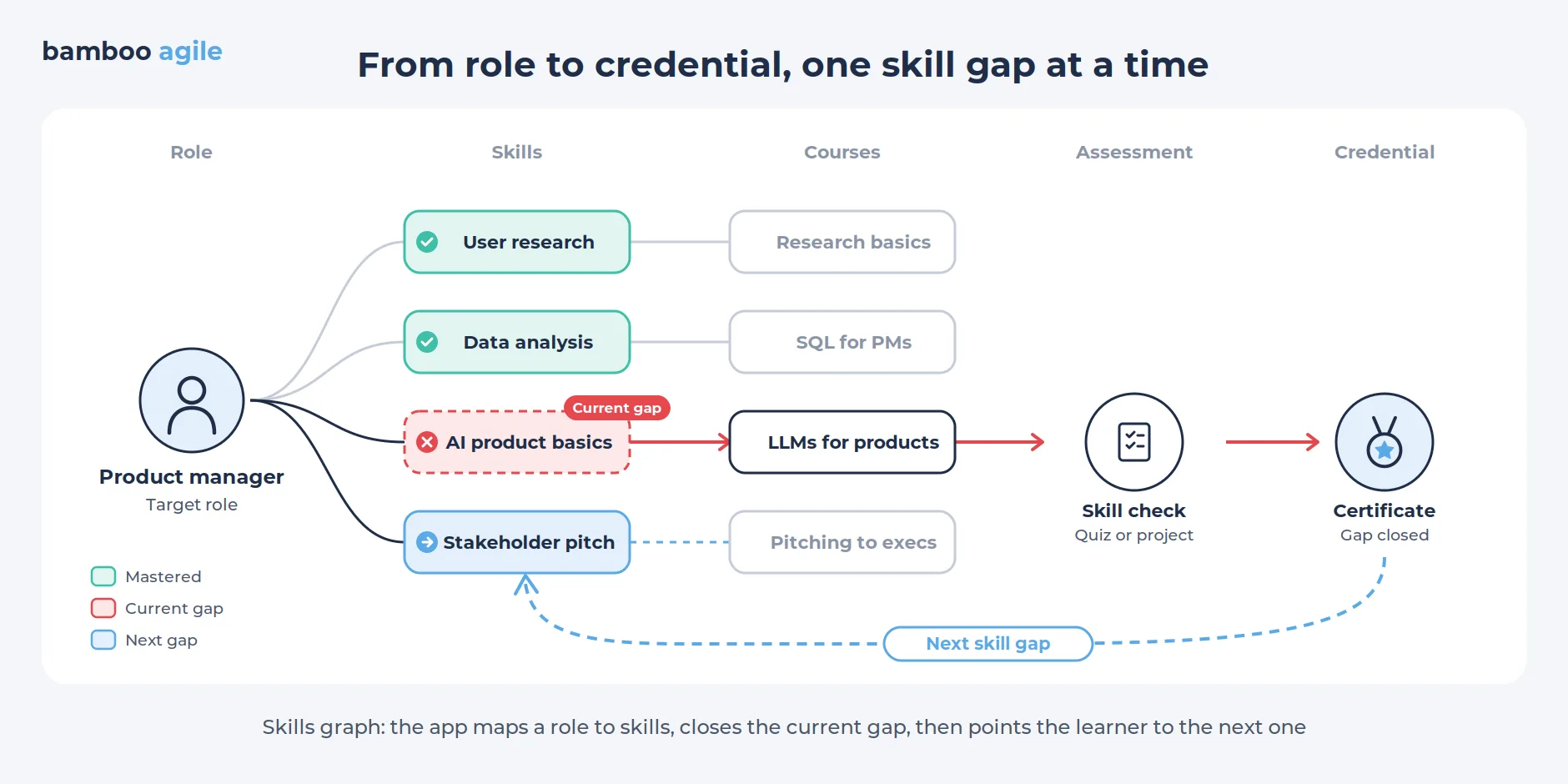
Skills-based learning tied to real roles
Employers nowadays buy training by the skill rather than by the course. For example, as part of the Skills Tracks program on the Coursera platform, the necessary skills and courses for each profession are selected based on the company’s data about the labor market.
Apps that show a learner which skill gap to close next, and then prove it was closed, match how corporate buyers now plan their budgets.
Popular e-Learning app examples
So, who are the biggest players in the field of e-Learning? Let’s find out.
Duolingo
Duolingo is a popular mobile e-Learning app for language learning that provides a fun and engaging method to learn new languages. It includes listening and speaking activities, making it an excellent choice for novices looking to improve their pronunciation.
It teaches a diverse spectrum of languages, from Spanish to German to Japanese. However, because of its limited vocabulary and lack of thoroughness, it may not be a good match for users who want to speak foreign languages fluently.
Nevertheless, in April 2025, Duolingo launched 148 new courses built with generative AI, more than doubling its offering.
Khan Academy
Khan Academy is a popular e-Learning app that covers a wide range of topics, including math, history, and programming. It offers fascinating videos and tutorials that make studying interactive and enjoyable.
It also offers quizzes and challenges to put users’ knowledge to the test, making it an excellent app for learners of all ages.
Its AI assistant, Khanmigo, tutors students and helps teachers plan lessons, and a 2024 partnership with Microsoft made Khanmigo for Teachers free for all US K-12 educators.
SoloLearn
SoloLearn is a coding application that teaches a variety of languages, including Python, HTML, and Java. Its interactive and captivating structure makes learning to code easy and enjoyable. It features quizzes and challenges to help users examine their knowledge, as well as a community where users may connect with other coders.
However, because of the curriculum’s limited depth and absence of supporting videos or tutorials, advanced coders may feel underwhelmed.
Lumosity
Lumosity is a brain training application that provides a variety of games to help with cognitive performance. It offers a personalized training program based on the users’ strengths and limitations, as well as progress tracking to help users measure their development. It is appropriate for all ages.
However, studies suggest that it has a limited impact on overall cognitive performance and may not be appropriate for users who want to train their brains more thoroughly.
Claims about outcomes carry real risk. Several years ago Lumos Labs paid $2 million to settle FTC charges that its ads promised benefits the science did not support. Any learning product that markets results should keep that case in mind.
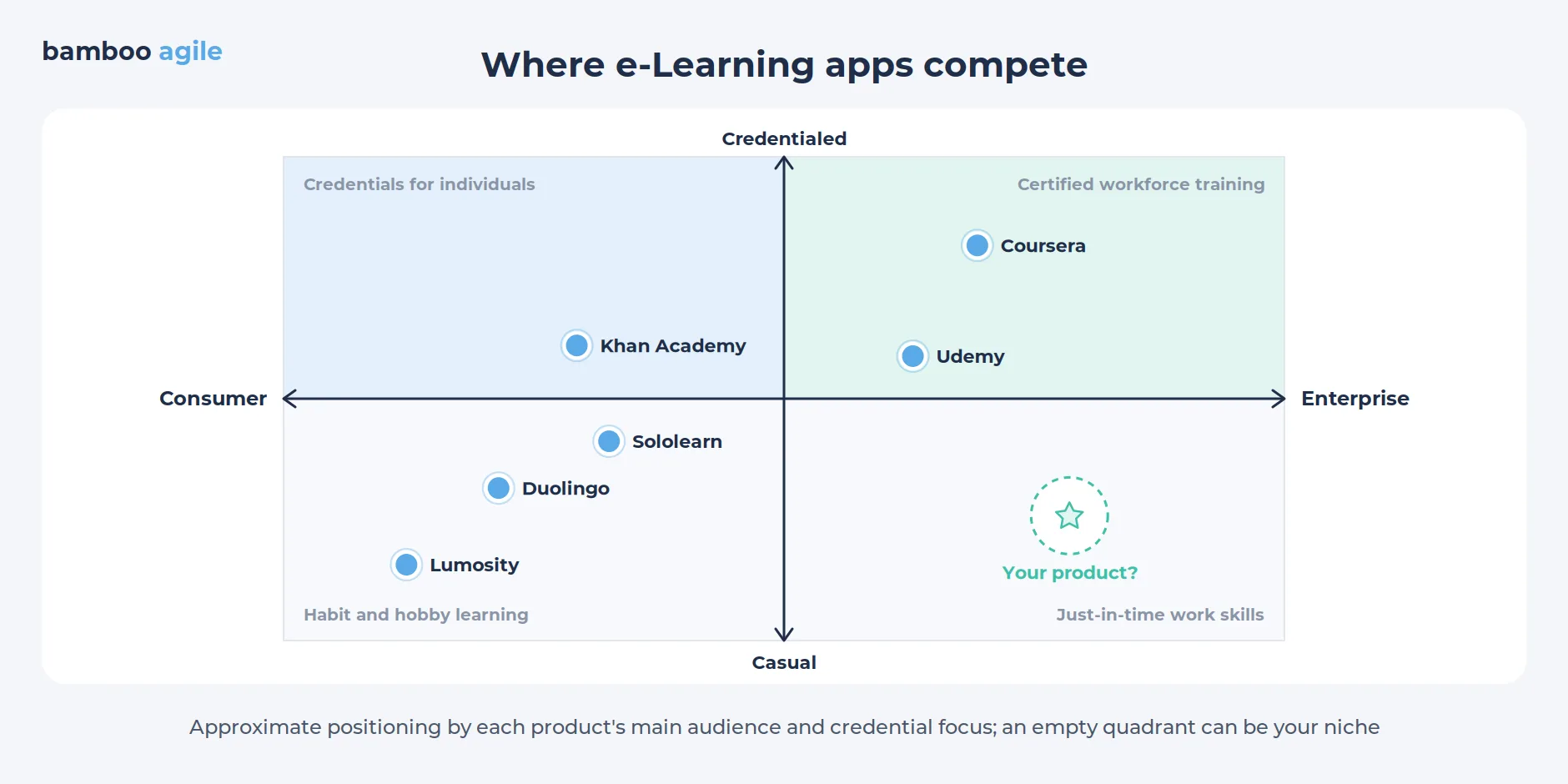
Apparently, the newest competitor for many learning apps is not another edtech startup. In July 2025, OpenAI introduced study mode in ChatGPT, which guides students through problems step by step instead of handing over answers. Google followed about a week later with a similar Guided Learning mode in Gemini, as TechCrunch reported. For a new product, the practical question is what it offers that a free chatbot does not. More on this shortly.
Working on a great e-Learning app idea
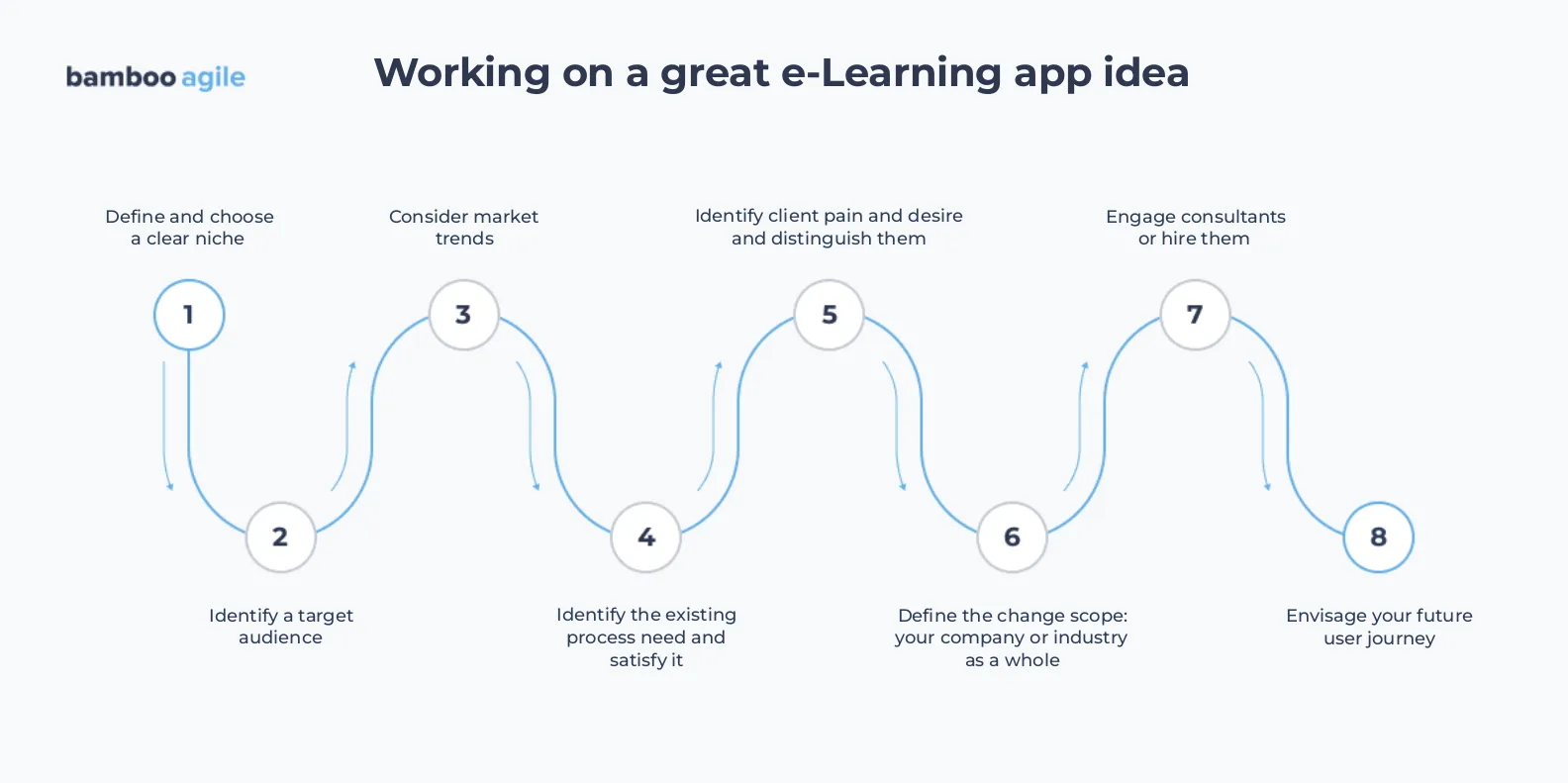
Define and choose a clear niche
Nobody wants just to make another e-Learning application, similar to many existing ones on the market. Businesses want to make something one-of-a-kind. So you have to research the market and identify a niche in which you will operate to succeed.
Identify a target audience
This step will aid in the identification of your target audience and possible application users. Consider their key wants and desires, as well as their approximate age. It will aid in providing a more precise list of planned functionalities for future implementation.
Consider market trends
You should be familiar with the market’s current trends. However, remember that “trendy” does not necessarily imply “a perfect fit”. So, take trends with caution. They just might not fit into the concept of your solution.
The same applies to AI. A chatbot bolted onto a course rarely helps, while an AI feature built around a specific learner problem, such as practicing answers for a job interview, often does.
Identify the existing process need and satisfy it
As previously stated, you must understand your target audience’s difficulties and demands. You must be certain about the pain or need that your product is addressing. It has to be a solution that solves the problem and needs of your clients and not just exists.
Identify client pain and desire and distinguish them
To expand on the preceding point, your clients’ desires and pains are not the same thing. You must address the pain but remember to consider how your clients want their pain to be addressed.
Define the change scope: your company or industry as a whole
First, you must conduct a preliminary analysis to see whether your project has potential. You must:
- Interview and survey potential users.
- Analyze the unfavorable feedback of your competitors. This will assist you in identifying your “don’ts” and avoiding some errors.
- Make a breakdown of your business plan. What are your plans for monetization? How long will the free trial last?
All of these tasks will help you see what you want to alter in the industry and, as a result, how you will change it.
Engage consultants or hire them
Seek expert counsel from more experienced colleagues or a team with business experience in this industry. They can be hired from outside of your company, as well as found among your colleagues.
Envision your future user journey
This is critical for businesses because one of the cornerstones to a company’s success is constant learning. For an employee, a structured user journey and a clear interface start with a development plan tied to the business strategy. It aids in connecting a team member’s personal development goals with the aims of a company, and that link motivates people to take on more responsibility.
Edtech apps that aid in the planning of the learning journey can also track the employee’s progress over time, offer various prizes and encouraging messages, and select relevant information to boost engagement. Virtual coworking and content co-creation venues where teams can collaborate online are fantastic ideas for such solutions.
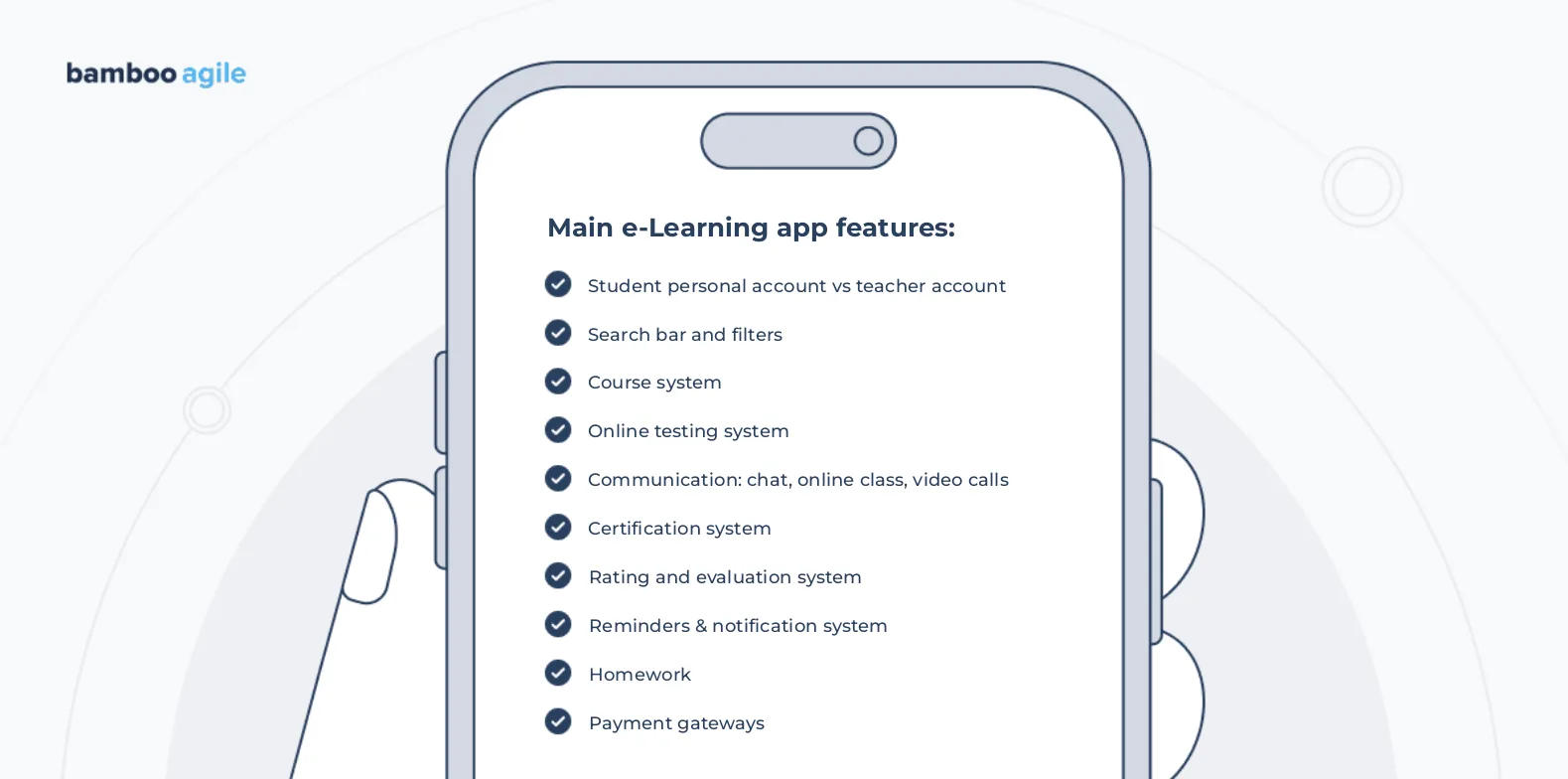
Main e-Learning app features
Assume you’ve decided on the type of software you’d like. A sound strategy is to build an MVP before the full-featured product.
The MVP (minimum viable product) is a simplified version of the program with only the most important functionality and simple interface. It’s less expensive than a full-fledged app, and it helps businesses determine if their idea is genuinely practical while spending the least amount of money. They can collect input from the early adopters and change features as needed.
You can learn more about our MVP developing services here.
Here are some important features you should consider for your application and possibly your MVP.
Student personal account vs teacher account
You must allow people to register in your e-Learning app. The user needs to be able to enter personal information, add payment cards, and so on.
It is also a good idea to create separate interfaces for teachers and students, as the feature sets they use will differ. Teachers, for example, should be able to keep track of their students, payments, progress with each of them, and so on. At the same time, students should have a clear schedule for both classes and fees.
Search bar and filters
This feature will be required by many sorts of apps for a variety of reasons. Tutoring apps cannot function without it; otherwise, how will a user locate an instructor on the app? The same is true for asynchronous learning platforms: users must be able to locate a required course. Add the option to use keywords or set filters to narrow down the search results to improve your app search.
Many teams now add semantic search as well, so a learner can type a question in plain language and get the matching lesson.
Course system
The course system is most likely the most essential element. A system like this manages the entire learning process. Typically, online learning materials are provided to virtual classrooms via interactive courses.
These are then integrated into a mobile environment for learning. The primary purpose of the course system is to simplify the process for teachers in order to create more convenient materials for learning.
Having said that, keep in mind that ease of use is a critical factor for teachers when selecting an application to work with. If your buyers are schools or companies, plan for interoperability from day one. Standards such as LTI 1.3, SCORM, and xAPI let your courses plug into the learning management systems those organizations already run.
Online testing system
The application should assist its users in running tests, preferably with anti-cheating methods. For example, you can make it hard to stop the app while a test is still running, create time limits for when a student must complete a test, and so on.
The catch is that generative AI makes take-home tests easy to game. Pew Research Center found in 2025 that 26% of US teens had used ChatGPT for schoolwork, double the 2023 share. Lockdown features still help for timed exams, but many teams now add short oral checks, in-app writing with version history, or questions tied to the learner’s own work.
Communication: chat, online class, video calls
When it comes to mobile e-Learning apps, quality chats and video conversations are crucial since they substitute face-to-face communication. As a result, you must establish a solid technical foundation for video conversations, allowing for stable calls on weak mobile connections, live captions, and controls that work on any screen size.
Certification system
Another crucial feature to consider when developing an e-Learning app is the ability to give certificates verifying that a specific learner completed a specific course. This system should be safeguarded so that obtaining a certificate without first passing a test is impossible.
Rating and estimation system
The grading mechanism deserves close attention. Teachers should be able to follow unambiguous acceptance, passing, and estimation standards. It is also a good idea to include deadlines in this part of your e-Learning application.
Reminders & notification system
Deadlines are inextricably linked to the learning process. They are also frequently difficult to track.
To mitigate that, you can send notifications about forthcoming deadlines, payments due, tests your users must complete, and so on.
Homework
Your application should make it easier for students to turn in their homework. At the same time, teachers should be able to grade them, assign new ones, establish deadlines, and so on. So, spend your time developing a thorough homework strategy.
Payment gateways
Payment options are vital for consumers of any e-Learning programme. For example, a custom learning management system may allow students to pay for a school lunch without moving to another piece of software. In the case of tutoring apps, a simple payment integration eliminates the need for teachers to build links or submit invoices directly in order to receive payment.
For that reason, make sure that secure payment methods (such as PayPal, Apple Pay, Google Pay, and others) are integrated into your e-Learning mobile application to make payments both convenient and secure.
For apps sold through the App Store or Google Play, check each store’s current rules on digital purchases before you design the checkout, because those rules decide which payment flows you can offer.
Accessibility
Accessibility is a purchase requirement for many buyers. Public schools and universities in the US must bring their web content and mobile apps up to WCAG 2.1 Level AA. Build captions, keyboard navigation, screen reader labels, and sufficient color contrast into the design system from the first sprint.
e-Learning app features that are especially in demand in 2026
As the e-Learning market changes, new trends continue to influence the e-Learning app development sector as a whole. Each of the trends described earlier has turned into concrete feature requests from learners and buyers, and below are the ones we see most in 2026.
AI-based features
Undeniably, AI is now the feature buyers ask about first. A trained model can follow how a learner progresses and adjust the next steps for them. The most common uses are these:
- Personalized learning paths. AI algorithms can analyze a learner’s data to identify their strengths and weaknesses, and then create a learning path that is tailored to their individual needs.
- Real-time feedback. AI can provide learners with real-time feedback on their progress, which can help them to identify and correct mistakes immediately.
- Adaptive learning experiences. AI can create adaptive learning experiences that adjust to the learner’s pace and understanding.
Gamification
Game mechanics are one of the most interesting ways to present instructional content. Gamification is used to make the user experience more enjoyable and rewarding in online and classroom settings alike. Puzzles, quizzes, and other forms of gamification are common.
Learn about 5 outstanding examples of gamified learning in our recent article.
Augmented and virtual reality
Augmented Reality and Virtual Reality are two technologies that are increasing the interactivity of the learning experience. They reach beyond typical screens, and educators are now generating virtual content for learners using other technologies such as IoT and 3D. These tactics provide learners with a more vivid and realistic user experience, which helps them remember what they practiced.
The AR technology can be used for safety training, medical training, language learning, environment learning and many more. Among the applications that have implemented AR features are Sandbox AR, Timepod Adventures, JigSpace, Adobe Aero, Complete Anatome, and more.
Upskilling and reskilling
To solve skill shortfalls, more and more organizations are focusing on upskilling and reskilling their employees.
Upskilling refers to the process of acquiring new skills or enhancing existing skills to improve one’s performance in their current job role. Reskilling, on the other hand, refers to the process of acquiring new skills to transition into a different job role or career. This may be necessary due to changes in technology, industry trends, or personal career goals.
MVP feature checklist
Before you finalize the MVP scope, check that it covers these basics:
- Separate roles for students and teachers or admins
- Search that finds a course or instructor in a few taps
- A course system teachers can update without developer help
- Tests with time limits and results that sync to the gradebook
- Notifications for deadlines and payments
- Captions, keyboard navigation, and WCAG 2.1 AA color contrast
- Privacy controls and parental consent if children may use the app
Regulations to plan for in 2026
Which rules apply depends on who your learners are, where they live, and what your AI features decide. The table summarizes the main ones for US and EU products.
| Rule | Who it affects | Key date | What it means for your app |
|---|---|---|---|
| EU AI Act, high-risk AI in education | AI that evaluates learners, decides admissions, or monitors exams for EU users | December 2, 2027, after the 2026 Digital Omnibus delay (Morgan Lewis, 2026) | Risk management, technical documentation, logging, and human oversight for those features |
| EU AI Act, Article 50 transparency | AI systems that interact with users, such as a chatbot tutor | In effect since August 2, 2026 (Cloud Security Alliance, 2026) | Tell users they are talking to an AI |
| ADA Title II web and mobile rule (US) | State and local governments, including public schools and universities, and in practice the vendors whose apps they use | April 26, 2027 for large entities; April 26, 2028 for smaller ones (Duane Morris, 2026) | Web content and mobile apps must meet WCAG 2.1 Level AA |
| Amended COPPA Rule (US) | Apps directed at children under 13, or that know they collect children’s data | Compliance required since April 22, 2026 (Davis Polk, 2026) | Written data retention policy, stricter parental consent, and a broader definition of personal information |
The EU delay gives teams more time, but it does not change the design work. If your roadmap includes AI grading or proctoring for EU customers, build logging and human review into the architecture now, while changes are still cheap.
US accessibility work should not pause either. The Department of Justice moved the ADA Title II deadline by one year in April 2026, yet the underlying obligation to make services accessible still applies, and the DOJ has said it expects to enforce the rule at the new date.
A step-by-step guide on how to create an e-Learning app
Now it’s time to sum up the information and gather a guide on how to create an e-Learning app.
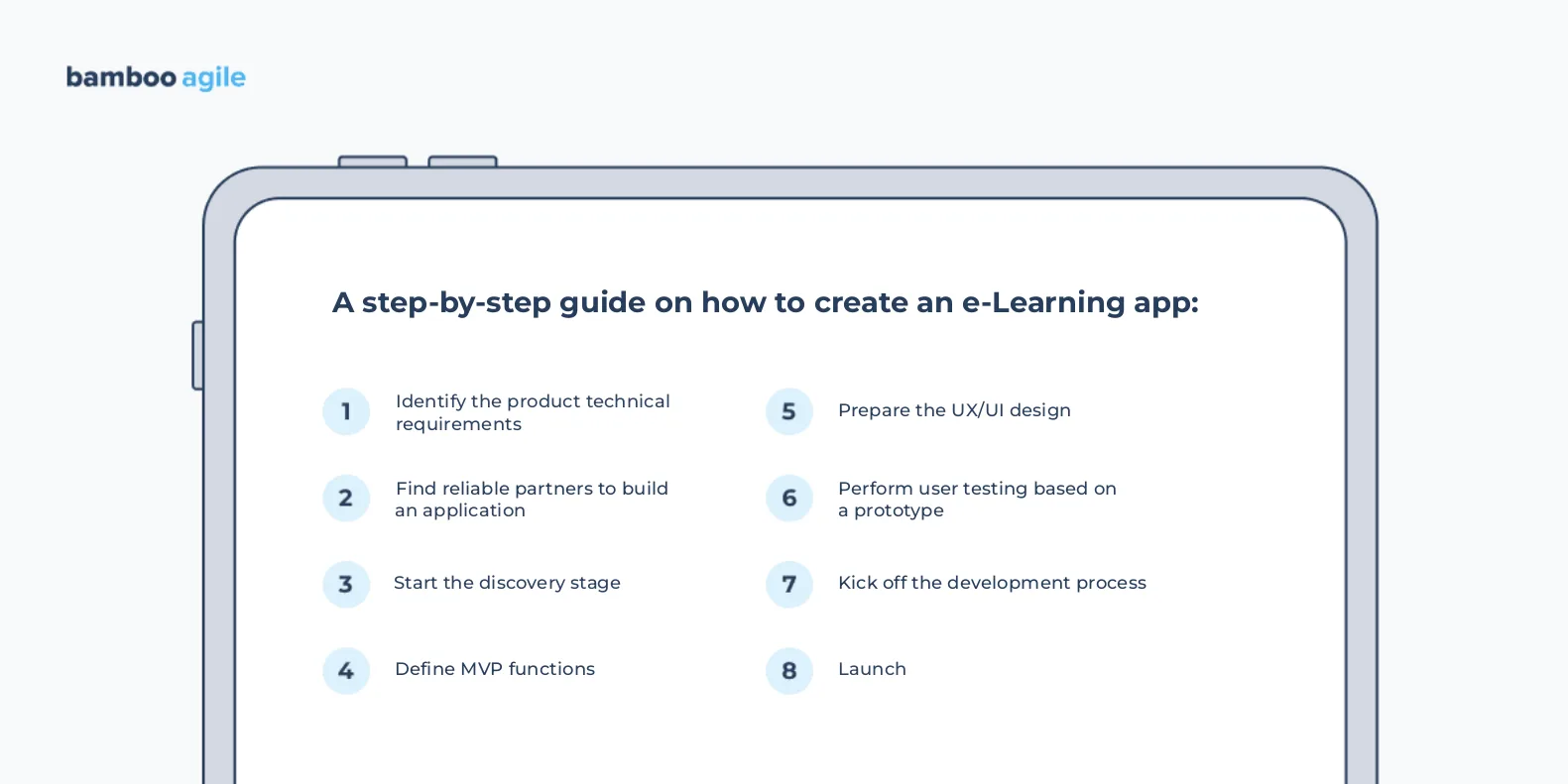
Step 1. Identify the product’s technical requirements
You must properly communicate your challenges and vision so that your e-Learning mobile app development team understands what needs to be done. Without specific requirements, your team will be unable to design successful e-Learning software.
Typically, the requirements document includes elements such as project overview, your needs and goals, the audience you want to target, your desired feature set, recommendations, references, prohibitions, and so on.
Step 2. Find reliable partners to build an application
Your business’s success is greatly reliant on the people you choose to collaborate with. So, take your time in locating a reputable source in order to successfully develop an e-Learning app.
Your partner should be able to quickly form and scale your dedicated team. And when it comes to e-Learning mobile app development teams, they must be powerful and experienced. You will undoubtedly require professionals such as business analysts, designers, developers, DevOps experts, QAs, and so on. And AI features call for someone with hands-on LLM experience.
It is also a good idea to review the vendor’s technology portfolio as well as testimonials from prior customers. Such information can be found in special company directories (for example, Clutch, the Manifest, GoodFirms, and others).
Step 3. Start the discovery stage
At this stage, experts thoroughly investigate the market, do competitive analysis, and analyze your target audience. It is also crucial at this stage to determine business, user, and discovery goals, as well as construct user stories and customer journey maps. All of these actions aid in gathering information about the product, the market in which it will operate, the target audience, and so on.
You can read more about the discovery phase in another article from our blog.
Step 4. Define MVP functions
MVP allows you to test your idea before it is fully created. It allows for simple product modification, with features being quickly added and eliminated based on how clients react to the MVP. Consider which features you should test initially and then scale according to the results and feedback received.
Step 5. Prepare the UX/UI design
Make sure your UX design goals are clear before beginning this phase. The following are the primary activities performed at this stage:
- ideas sketching;
- prototypes development;
- user input gathering;
- design decision-making.
The roadmap is prepared to begin the UX design process based on the application’s concept and design. The information architecture and wireframes are also generated during this stage.
Step 6. Perform user testing based on a prototype
The testing step allows the prototype to be perfected. There are three critical stages of testing: focus group interviews, assessment research, and usability reports.
Step 7. Kick off the development process
Technical documentation
During this stage, all necessary information from the client is gathered in order to develop a product that meets the client’s expectations and requirements. Technical documentation and technical stacks should be created by the team.
The team should also establish the needs for functionality (admin panel requirements) and user roles (admin and super admin) at this point. The estimation and scope of work should also be finalized by the team.
You’ll typically need Swift professionals for iOS apps, Kotlin specialists for Android apps, and React Native or Flutter developers for cross-platform applications. AI features add decisions of their own at this point: which model provider to use, where learner data is processed, and how the team will monitor answer quality.
Development
Frontend developers are in charge of the application’s client side. API and database development are the responsibility of backend developers.
When it comes to mobile app development, however, there is usually no clear distinction between frontend and backend. So, in essence, all you need is a qualified mobile app developer. But do not forget that your participation and communication in the development process is very important.
Testing
All provided code is tested by QA engineers manually and automatically, with automated tests being written and launched for developed components. The most optimal way is to perform testing not in parallel with development, but after finishing it. In case your app requires AI features, the team should also keep an evaluation set that checks answer accuracy before each release.
Deployment & integration
The tested version of the product is sent to users for beta testing once the QA team has completed development and regression testing.
Maintenance
The maintenance stage follows the deployment of an app in the production environment. If an issue arises that needs to be resolved, or if something needs to be enhanced, the development team is in charge of all of these actions at this stage.
Launch
The market is ready to view your application now! To ensure that clients receive the product favorably, the product launch procedure should be carried out methodically. The following are the critical steps in the product launch process:
- Target audience identification;
- Distinctive product packaging creation;
- Tagline and timeline creation;
- Competitor analysis;
- Application development;
- Users onboarding;
- Advertising.
Following these steps you are likely to succeed in developing your product.
Bamboo Agile’s e-Learning app development expertise
MasteryPrep
MasteryPrep, a service for developing educational tests and assessments, wanted to create a QTI player (QTI being a format which is extensively used by EdTech businesses).
Bamboo Agile has developed a WCAG-compliant player for showing and completing QTI-format tests to share learner assessment data. The player is a PWA that supports many custom sorts of test questions and is designed to facilitate adaptive testing.
Znaj
Znaj is a single platform of electronic educational services that strives to improve the effectiveness of the educational process.
The platform was designed to simplify organizational challenges while emphasizing the significance of great learning outcomes. The system helps automate mundane chores, assisting staff in organizing the teaching process, parents in tracking their children’s development, and students in focusing on learning. As a virtual learning environment, the platform includes features that are arranged in accordance with modern school needs from an online gradebook and class register to an electronic document management system that connects all educational participants.
It also features a first-of-a-kind integrated iPay online payment system. It provides a simple way to pay for major school-related expenses such as meals, printed textbooks, extracurricular activities, and other fees.
BeED
BeED LMS is an elaborate learning management system designed to turn traditional learning and teaching into active collaboration among institutions, educators, parents, and students.
It assists educational institutions in evaluating rather than simply grading students’ work. BeED also fosters trust and transparency in education by encouraging learners to be actively involved in the learning process and to appreciate parental involvement.
The custom EdTech software has such massive features as a diary, curriculum builder, content builder, and timetabler.
Costs of e-Learning app development

The cost of developing an e-Learning application can vary greatly based on the project’s complexity and the level of expertise required. Before committing to a budget or timetable for constructing an e-Learning application for your firm, carefully analyze your choices. Here are some things to think about before hiring an e-Learning app development company.
Development team
There are multiple options for hiring a development team, however, the most popular ones are in-house and outsourcing teams.
In-house development team
An in-house development team is a group of developers who are directly employed by the company that owns the product. These employees work on-site at the company’s office, and they are typically responsible for all aspects of the development process, from design and coding to testing and deployment. In-house teams keep expertise inside the company and fix bugs quickly after release. Communication also tends to be more direct.
Outsourcing development team
An outsourcing development team is a group of external contractors who are hired by the client company to develop an app or product. These contractors typically work remotely, and they may be located in a different country. Outsourced teams usually cost less and start work quickly. You also skip the effort of hiring and managing staff, and you get access to an international talent pool.
Operating platform
The operating system determines the software you choose to construct your apps as well as the cost of development. On computers, most e-Learning platforms run in the browser, which covers Windows, macOS, and ChromeOS at once. For mobiles, there are a few popular operating systems, too, namely Android and iOS.
App size
The number of pages and features in an app determines its size. Apps are usually classified into one of three types according to the number of key feature pages: small, medium, and large. The larger the software, the more time it takes for developers to finish it. Thus, more features result in higher costs.
App complexity
The application’s complexity also has a significant impact on its development time. Depending on the type and complexity of the app, the corporation may need to invest anywhere from 80 to over 700 hours in its development – and that’s just for the basic coding. Software with a complicated backend and numerous integrations may necessitate over 1500 hours of development work, as well as a much larger team of specialists.
Features
It’s obvious that any feature you add to your application requires time and effort to develop it. So the math here is simple: the more you add, the more you pay.
But keep in mind that there is a basic set of features that every e-Learning application on the market has, and there is an advanced set of features that can help you to stand out from competitors and gain more popularity than them. You need to estimate the market, monitor your competitors, and wisely approach this issue.
AI running costs
AI features change the cost structure after launch. Each tutoring conversation or generated quiz calls a model, and providers bill by usage, so this cost rises with your audience instead of staying flat like hosting. The possible fix is to cache common responses, route simple tasks to smaller models, and set usage limits per pricing plan.
Summing up
The cost of a custom e-Learning app will vary depending on the app’s size and complexity, number of features, and development team. According to Clutch, the average cost of a custom app is less than $200,000.
But do not forget that if you choose outsourced development, the price is highly dependent on the developer’s rates. The highest developers’ rates are in the USA, Canada, and Australia – $100-$149 per hour.
Accelerance’s 2026 outsourcing rates outlook puts senior developers in Europe at $64 to $76 per hour, with the strongest downward pressure in Central and Eastern Europe.
The cheapest option is to hire an outsourcing team from India, however, the quality of the final product is questionable. In terms of the price/quality ratio, your best choice is Eastern Europe. It remains a strong middle ground for many Western companies, thanks to overlapping work hours and a deep engineering talent pool.
The cost is also heavily dependent on your requirements and development time. Keep in mind that the pricing has an impact on how well your solution works. If you thoroughly study what you need the software to do, you can save a lot of money.
In case you have a vision for your e-Learning application, feel free to reach out to get a clearer picture of possible app costs.
Conclusion
An effective e-learning application needs a well-thought-out approach that considers both user demands and company objectives.
Focus on a few things done well: content that experts have checked, features that save teachers time, and AI that helps learners think instead of doing the work for them. That kind of product gives employees or students a reason to keep learning.
Bamboo Agile is a group of specialists who share your desire to learn new things. Our developers have the necessary expertise and skill sets to construct a compelling e-Learning application for your organization, paving the way for corporate innovation and growth. Contact us to discuss the details of your e-Learning app idea and plan the first release together.